This documentation provides a guide on configuring and mapping entities from Microsoft Dynamics 365 F&O using Process Designer. These examples provide a sample setup based on different supported entities in Microsoft Dynamics 365 F&O.
Each example showcases how to:
-
Map relevant fields and entities for sales order processing.
-
Configure the BOM and Route entities to support production activities.
-
Set up complex product configurations with dimensions, variants, and operational details.
Example Sales Order
The following sections provide examples of how you can configure and map the SalesOrderHeaderEntity within Process Designer. Additionally, it covers handling sales order lines with and without BOM and route generation. Reviewing these examples can help you understand how to map to the SalesOrderHeaderEntity for your use case.
Sales Order Process Context
|
Field |
Value |
|---|---|
|
Name |
Any friendly name. |
|
Process integration |
Name of Microsoft Dynamics 365 F&O Process integration. |
|
Entity |
|
Sales Order Process Maps
|
ld |
Value |
Notes |
|---|---|---|
|
Name |
Sales Order Header |
|
|
Process integration |
Name of Microsoft Dynamics 365 F&O Process integration. |
|
|
Entity |
|
|
|
Field Mapping Template |
|
|
|
Option Link Property |
|
|
Lines - Mapping
|
Name |
Field |
Data type |
Mapping type |
Properties |
Value |
|---|---|---|---|---|---|
|
Sales order number |
SalesOrderNumber |
String |
Key |
|
|
|
Site |
DefaultShippingSpeed |
String |
Property |
SiteId |
|
Site Note
The Default site only needs to be populated on the Sales Order Header if it is not done manually during the Microsoft Dynamics 365 F&O setup on the account. See Set up Cloud Connect for Microsoft Dynamics 365 F&O for more information.
Process Map Sales Order Lines without BOM and Route
Header - Details Sales Order Lines without BOM and Route
|
Field |
Value |
|---|---|
|
Name |
Sales Order Line no BOM route |
|
Process integration |
Name of Microsoft Dynamics 365 F&O Process Integration. |
|
Entity |
|
|
Field Mapping Template |
|
|
Option Link Property |
|
Lines - Mapping Sales Order Lines without BOM and Route
|
Name |
Field |
Data type |
Mapping type |
Properties |
Value |
Option attribute |
|---|---|---|---|---|---|---|
|
LotID |
InventoryID |
String |
Key |
|
|
|
|
ItemNumber |
ItemNumber |
String |
Option Attribute |
|
|
Id |
|
Quantity |
OrderedSalesQuantity |
Decimal |
Property |
Quantity |
|
|
Process Map Sales Order Lines with BOMID and Route
Header - Details Sales Order Lines with BOMID and Route
|
Field |
Value |
|---|---|
|
Name |
Sales Order Line with BOM route |
|
Process integration |
Name of Microsoft Dynamics 365 F&O Process Integration. |
|
Entity |
SalesOrderLineEntity |
|
Field Mapping Template |
|
|
Option Link Property |
|
Lines - mapping Sales Order Lines with BOMID and Route
|
Name |
Value |
Data Type |
Mapping type |
Properties |
Value |
Source |
Destination |
Option attribute |
|---|---|---|---|---|---|---|---|---|
|
LotId |
InventoryLotId |
String |
Key |
|
|
|
|
|
|
ItemNumber |
ItemNumber |
String |
Option Attributes |
|
|
|
|
Id |
|
Quantity |
OrderedSalesQuantity |
Decimal |
Property |
Quantity |
|
|
|
|
|
BOM Number |
BOMID |
String |
Source |
|
|
|
bomnum |
|
|
Route Number |
RouteId |
String |
Source |
|
|
|
routenum |
|
Process Map Sales Order Lines with Product Dimension Configuration
Header - Details Sales Order Lines with Product Dimension Configuration
|
Field |
Value |
|---|---|
|
Name |
Sales Order Line with Config |
|
Process Integration |
Name of Microsoft Dynamics 365 F&O. |
|
Entity |
|
|
Field Mapping Template |
|
|
Option link property |
|
Lines - Mapping Sales Order Lines with Product Dimension Configuration
|
Name |
Field |
Data type |
Mapping type |
Properties |
Value |
Source |
Destination |
Option attribute |
|---|---|---|---|---|---|---|---|---|
|
LotId |
InventoryLotID |
String |
Key |
|
|
|
|
|
|
ItemNumber |
ItemNumber |
String |
Option Attribute |
|
|
|
|
Id |
|
Quantity |
OrderedSalesQuantity |
Decimal |
Property |
Quantity |
|
|
|
|
|
Product dimension configuration |
ProductConfigurationID |
String |
Source |
|
|
|
configMas |
|
|
Sub-BOM |
BOMId |
String |
Source |
|
|
|
bomnum |
|
|
Subroute |
RouteId |
String |
Source |
|
|
|
routenum |
|
Process Map Distinct Released Product
Header - Details Distinct Released Product
|
Field |
Value |
|---|---|
|
Name |
Microsoft Dynamics 365 F&O Distinct Product |
|
Process Integration |
Name of Microsoft Dynamics 365 F&O Process Integration. |
|
Entity |
|
|
Field Mapping Template |
|
|
Option link property |
|
Lines - Mapping Distinct Released Product
|
Name |
Field |
Data type |
Mapping Type |
Properties |
Value |
Source |
Destination |
|---|---|---|---|---|---|---|---|
|
ItemId |
ItemNumber |
String |
Number series |
|
ITEMUSMF |
itemNum |
|
|
Description |
PDT_Description |
String |
Property |
Description |
|
|
|
|
Item model group |
ItemModelGroupID |
String |
Constant |
|
FIFO |
|
|
|
Product group id |
ProductGroupId |
String |
Constant |
|
Audio |
|
|
|
Tracking dimension group |
TrackingDimensionGroupName |
String |
Constant |
|
None |
|
|
|
Storage dimension group |
StorageDimensionGroupName |
String |
Constant |
|
SiteWH |
|
|
ItemId Note
The number sequence ITEMUSMF needs to be set up inMicrosoft Dynamics 365 F&O as described in Set up Cloud Connect for Microsoft Dynamics 365 F&O under Number Sequences. ITEMUSMF is just an example number sequence.
Process Map ProductMaster
Header - Details Master Released Product
|
Field |
Value |
|---|---|
|
Name |
Microsoft Dynamics 365 F&O ProductMaster |
|
Process Integration |
Name of Microsoft Dynamics 365 F&O Process Integration. |
|
Entity |
|
|
Field Mapping Template |
|
|
Option link property |
|
Lines - Mapping Item Number
|
Name |
Field |
Data type |
Mapping Type |
Value |
Source |
Destination |
|---|---|---|---|---|---|---|
|
ItemId |
ItemNumber |
String |
Option Attribute |
|
itemMas |
|
Process Map Product Variant
Header - Details Product Variant
|
Field |
Value |
|---|---|
|
Name |
Microsoft Dynamics 365 F&O Product Variant source |
|
Process Integration |
Name of Microsoft Dynamics 365 F&O Process Integration. |
|
Entity |
|
|
Field Mapping Template |
|
|
Option link property |
|
Lines - Mapping Product Variant
|
Field |
Data Type |
Mapping type |
Properties |
Value |
Source |
Destination |
Option Attribute |
|---|---|---|---|---|---|---|---|
|
Product Master |
ProductMasterNumber |
String |
Option Attribute |
|
|
|
Id |
|
Configuration |
ProductconfigurationId |
String |
Number Series |
CONFIGUSMF |
configMas |
|
|
|
Size |
ProductSizeId |
String |
Key |
|
|
|
|
|
Color |
ProductColorId |
String |
Key |
|
|
|
|
|
Style |
ProductStyleId |
String |
Key |
|
|
|
|
|
Version |
ProductVersionId |
String |
Key |
|
|
|
|
|
Item Number |
ItemNumber |
String |
Option Attribute |
|
|
|
Id |
ConfigurationNote
The number sequence ITEMUSMF needs to be set up inMicrosoft Dynamics 365 F&O as described in Set up Cloud Connect for Microsoft Dynamics 365 F&O under Number Sequences. ITEMUSMF is just an example number sequence.
BOM version Process Map
Header - Details BOM version
|
Field |
Value |
|---|---|
|
Name |
Microsoft Dynamics 365 F&O BOMVersion |
|
Process Integration |
Name of Microsoft Dynamics 365 F&O Process Integration. |
|
Entity |
|
|
Field Mapping Template |
|
|
Option Link Property |
|
Lines - Mapping BOM version
|
Name |
Field |
Data type |
Mapping type |
Properties |
Value |
Source |
Destination |
Option Attribute |
|---|---|---|---|---|---|---|---|---|
|
Item Number |
ManufacturedItemNumber |
String |
Option Attribute |
|
@Id |
|
|
Id |
|
BOMNumber |
BOMId |
String |
Number Series |
|
Bill_25 |
bomnum |
|
|
|
Site |
ProductionSiteId |
String |
Key |
|
|
|
|
|
|
Configuration |
ProductConfigurationId |
String |
Source |
|
|
|
ConfigMas |
|
|
Color |
ProductColorId |
String |
Key |
|
|
|
|
|
|
Size |
ProductSizeId |
String |
Key |
|
|
|
|
|
|
Version |
ProductVersionId |
String |
Key |
|
|
|
|
|
|
Active |
IsActive |
Boolean |
Constant |
|
true |
|
|
|
|
Valid from date |
ValidFromDate |
Date |
Key |
|
2024-10-01 |
|
|
|
|
From quantity |
FromQuantity |
Decimal |
Constant |
|
1 |
|
|
|
|
Is approved |
IsApproved |
Boolean |
Constant |
|
true |
|
|
|
|
Approver personnel number* |
ApproverPersonnelNumber |
String |
Constant |
|
000001 |
|
|
|
|
Name |
VersionName |
String |
Property |
|
Description |
|
|
|
Approver personnel number Note
State personnel number must be used to approved BOMs. (000001 is an example from the standard MS Contoso environment). Generic Integrator does not support user impersonation yet, so therefore it needs to be a fixed personnel number. The existing Microsoft Dynamics 365 F&O integrator is richer in functionality and can put a personnel number depending on the logged-in user.
BOM line Process Map
Header - Details BOM line
|
Field |
Value |
|---|---|
|
Name |
Microsoft Dynamics 365 F&O BomLine |
|
Process Integration |
Name of Microsoft Dynamics 365 F&O Process integration. |
|
Entity |
|
|
Template |
|
|
Option link property |
|
Lines - mapping BOM line
|
Name |
Field |
Data type |
Mapping type |
Properties |
Value |
Number series |
Source |
Destination |
Option Attribute |
|---|---|---|---|---|---|---|---|---|---|
|
BOMNumber |
BOMId |
String |
Key |
|
|
|
|
|
|
|
Line creation seq |
LineCreationSequenceNumber |
Integer |
Key |
|
|
|
|
|
|
|
Line number |
LineNumber |
Decimal |
Number series |
|
|
detail |
|
|
|
|
Quantity |
Quantity |
Decimal |
Property |
Quantity |
|
|
|
|
|
|
Item id |
ItemNumber |
String |
Property |
ERP_ItemNo |
|
|
|
|
|
BOM line with ID Process Map
Header - Details BOM line with ID
|
Field |
Value |
|---|---|
|
Name |
Microsoft Dynamics 365 F&O BomLine with id |
|
Process Integration |
Name of Microsoft Dynamics 365 F&O Process Integration. |
|
Entity |
|
|
Template |
|
|
Option link property |
|
Lines - mapping BOM line with ID
|
Name |
Field |
Data type |
Mapping type |
Properties |
Value |
Number series |
Source |
Destination |
Option Attribute |
|---|---|---|---|---|---|---|---|---|---|
|
BOMNumber |
BOMId |
String |
Key |
|
|
|
|
|
|
|
Line creation seq |
LineCreationSequenceNumber |
Integer |
Key |
|
|
|
|
|
|
|
Line number |
LineNumber |
Decimal |
Number series |
|
|
detail |
|
|
|
|
Quantity |
Quantity |
Decimal |
Property |
Quantity |
|
|
|
|
|
|
Item id |
ItemNumber |
String |
Option Attribute |
|
|
|
|
|
id |
BOM line with conf(configuration) Process Map
Header - Details BOM line with conf
|
Field |
Value |
|---|---|
|
Name |
Microsoft Dynamics 365 F&ORouteVersion |
|
Process integration |
Name of Microsoft Dynamics 365 F&OProcess integration. |
|
Entity |
|
|
Template |
|
|
Option link property |
|
Lines - mapping BOM line with conf
|
Name |
Field |
Data type |
Mapping type |
Properties |
Value |
Number series |
Source |
Destination |
Option Attribute |
|---|---|---|---|---|---|---|---|---|---|
|
BOMNumber |
BOMId |
String |
Key |
|
|
|
|
|
|
|
Line creation seq |
LineCreationSequenceNumber |
Integer |
Key |
|
|
|
|
|
|
|
Line number |
LineNumber |
Decimal |
Number series |
|
|
detail |
|
|
|
|
Quantity |
Quantity |
Decimal |
Property |
Quantity |
|
|
|
|
|
|
Item id |
ItemNumber |
String |
Option Attribute |
|
|
|
|
|
id |
|
Configuration |
ProductConfigurationId |
String |
Source |
|
|
|
|
configMas |
|
Route version Process Map
Header - Details Route version
|
Field |
Value |
|---|---|
|
Name |
Microsoft Dynamics 365 F&O RouteVersion |
|
Process integration |
Name of Microsoft Dynamics 365 F&O Process integration. |
|
Entity |
|
|
Template |
|
|
Option link property |
|
Lines - mapping Route version
|
Name |
Field |
Data type |
Mapping type |
Properties |
Value |
Number series |
Source |
Destination |
Option Attribute |
|---|---|---|---|---|---|---|---|---|---|
|
From quantity |
ValidFromQuantity |
Decimal |
Constant |
|
1 |
|
|
|
|
|
From date |
ValidFromDate |
Date |
Key |
|
|
|
|
|
|
|
Route number |
RouteId |
String |
Number Series |
|
Rout_11 |
|
|
|
|
|
Size |
ProductSize |
String |
Key |
|
|
|
|
|
|
|
Color |
ProductColorId |
String |
Key |
|
|
|
|
|
|
|
Site |
ProductionSiteId |
String |
Key |
|
|
|
|
|
|
|
Configuration |
ProductConfigurationId |
String |
Key |
|
|
|
|
|
|
|
Style |
ProductStyleId |
String |
Key |
|
|
|
|
|
|
|
Version |
ProductVersionId |
String |
Key |
|
|
|
|
|
|
|
ItemId |
ItemNumber |
String |
Option Attribute |
|
|
|
|
|
Id |
|
Is active |
IsActive |
Boolean |
Constant |
|
true |
|
|
|
|
|
Approved |
IsApproved |
Boolean |
Constant |
|
true |
|
|
|
|
|
Approver personnel number |
ApproverPersonnelNumber |
Boolean |
Constant |
000001 |
|
|
|
|
|
|
Name |
VersionName |
String |
Property |
Description |
|
|
|
|
|
Approver personnel number Note
State personnel number must be used to approve BOMs. (000001 is an example from the standard MS Contoso environment). Generic Integrator does not support user impersonation yet, so it needs to be a fixed personnel number. The existing Microsoft Dynamics 365 F&O integrator is richer in functionality and can put a personnel number depending on the logged-in user.
Route operation Process Map
Route Operation Header - Details
|
Field |
Value |
|---|---|
|
Name |
Microsoft Dynamics 365 F&O Route operation |
|
Process integration |
Name of Microsoft Dynamics 365 F&O Process integration. |
|
Entity |
RouteRouteOperationEntity |
|
Template |
|
|
Option link property |
|
Lines Mapping Route operation
|
Name |
Field |
Data type |
Mapping type |
Properties |
Value |
Number series |
Source |
Destination |
|---|---|---|---|---|---|---|---|---|
|
Route Id |
RouteId |
String |
Property |
|
|
|
|
|
|
OperationNum |
OperationNumber |
Integer |
Number Series |
|
detail |
|
|
|
|
Operation priority |
OperationPriority |
String |
Constant |
|
0 |
|
|
|
|
Next operation number |
NextRouteOperationNumber |
Integer |
Constant |
|
0 |
|
|
|
|
Operation id |
OperationId |
String |
Property |
ERP_ItemNo |
|
|
|
|
Process Map Route operation resource requirements entity
Header - Details Route operation resource requirements entity
|
Field |
Value |
|---|---|
|
Name |
Microsoft Dynamics 365 F&O Route operation resource requirements entity |
|
Process integration |
Name of Microsoft Dynamics 365 F&O Process integration. |
|
Entity |
|
|
Template |
|
|
Option link property |
|
Lines - Mapping Route Operation Resource Requirements Entity
|
Name |
Field |
Data type |
Mapping type |
Properties |
Notes |
|---|---|---|---|---|---|
|
Record-Id |
RecordId |
Longer |
Key |
|
|
|
Capability |
RequiredCapabilityName |
String |
Property |
capability |
Only be populated if requirement type == Capability |
|
Resource group |
RequiredOperationsResourceGroupId |
String |
Property |
resourcegroup |
Only be populated if requirement type == ResourceGroup |
|
Resource |
RequiredOperationsResourceId |
String |
Property |
resource |
Only be populated if requirement type == resource |
|
Skill |
RequiredSkillId |
String |
Property |
skill |
Only be populated if requirement type == Skill |
|
Level |
RequiredSkillLevel |
String |
Property |
skill |
Only be populated if requirement type == Skill |
|
Title |
RequiredTitleId |
String |
Property |
title |
Only be populated if requirement type == Title |
|
Certificate |
RequiredCertificateType |
String |
Property |
certificate |
Only be populated if requirement type == Certificate |
|
Course |
RequiredCourseId |
String |
Property |
course |
Only be populated if requirement type == Course |
|
Resource type |
RequiredOperationsResourceType |
String |
Property |
resourcetype |
Only be populated if requirement type == ResourceType with values Vendor/Personnel/Machine/Tool/Location/Group/Facility |
|
Job scheduling |
WillJobSchedulingUseRequirement |
Boolean |
Constant |
true |
|
|
Operations scheduling |
WillOperationSchedulingUseRequirement |
Boolean |
Constant |
true |
|
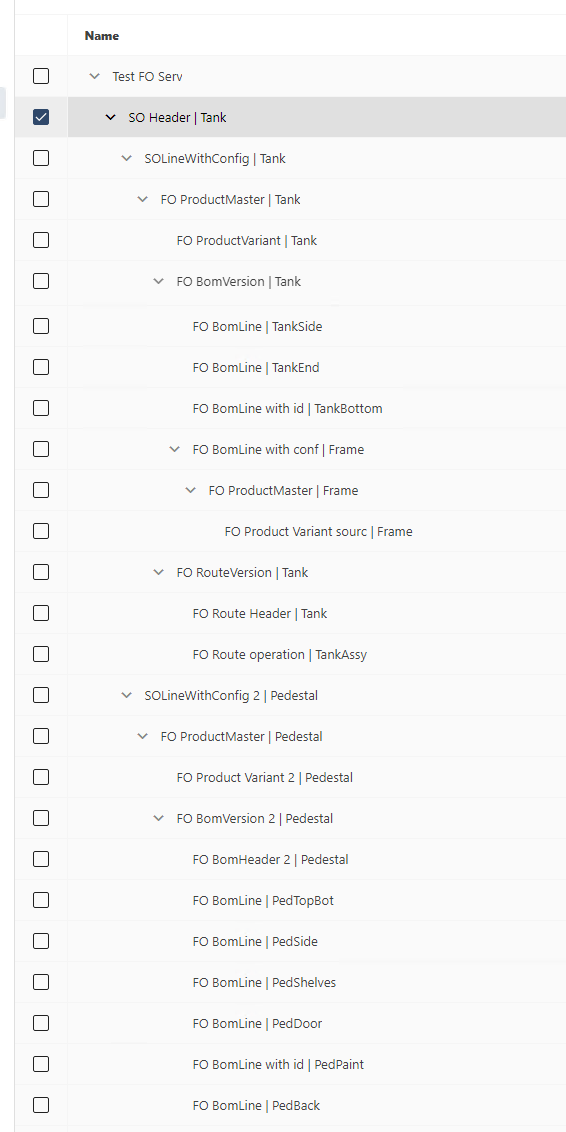
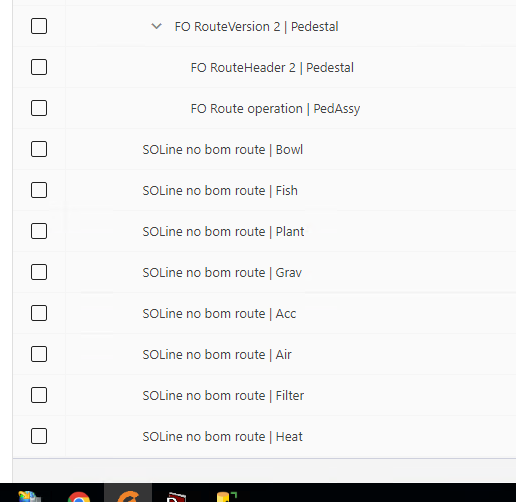
Diagram of Complete Process Structure for Sales Order in Microsoft Dynamics 365 F&O
The Process Designer Process Structure below uses our Anne's Aquariums database as an example.
Example Process Structure Diagram

Example Process Structure View in Process Designer
Example Product Variant
The following sections provide examples of how you can map product variants within Process Designer.
Assumptions
-
The product master already exists and is released to the current Microsoft Dynamics 365 F&O company.
-
Using standard Microsoft Dynamics 365 F&O, an intercompany relation is set up for a customer and vendor.
-
The Property propertysetid is populated using function GETURLARGUMENTVALUE in Design Center.
Setup
-
In Microsoft Dynamics 365 F&O, under Modules > Experlogix processing entities:
-
Add processing entity for table/entity XplPropertyTable
-
Set the Add property set field for processing entity EcoResReleasedProductVariantEntity to true.
-
On the processing entity EcoResReleasedProductVariantEntity set the Field connection type to either Global configuration or Global configuration / company state
-
-
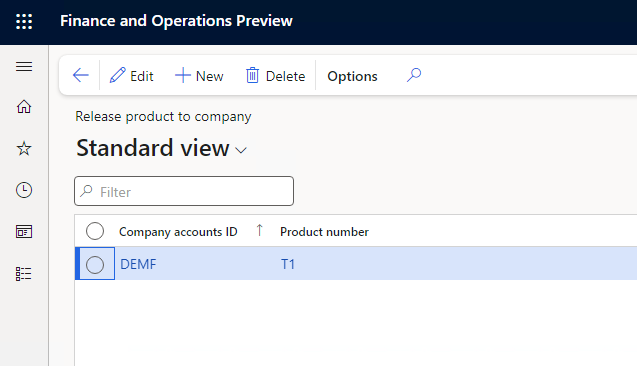
In Microsoft Dynamics 365 F&O, navigate to Modules > Experlogix > Release product to company.
-
Set up the release of product variants to other companies. In the below example, product master T1 is used and any new product variant is released to company DEMF.
Released Product Variant
Header - Released Product Variant Details
|
Field |
Value |
|---|---|
|
Name |
productVariant |
|
Process integration |
Name of Microsoft Dynamics 365 F&O Process integration. |
|
Entity |
|
Lines - Released Product Variant Mapping
|
Name |
Field |
Data type |
Mapping type |
Properties |
Value |
Source |
Destination |
|---|---|---|---|---|---|---|---|
|
Product master |
ProductMaterNumber |
String |
Property |
|
|
|
itemMas |
|
Configuration |
ProductConfigurationId |
String |
Number series |
|
ITEMUSMF |
|
|
|
Size |
ProductSizeId |
String |
Property |
|
|
|
|
|
Color |
ProductColorId |
String |
Property |
|
|
|
|
|
Style |
ProductStyleId |
String |
Property |
|
|
|
|
|
Version |
ProductVersionId |
String |
Property |
|
|
|
|
|
Item number |
ItemNumber |
String |
Property |
|
|
|
itemMas |
Number series ITEMUSMF needs to setup as described in Set up Cloud Connect for Microsoft Dynamics 365 F&O.
Master Released Product
Header - Details Master Released Product
|
Field |
Value |
|---|---|
|
Name |
Microsoft Dynamics 365 F&O ProductMaster |
|
Process integration |
Name of Microsoft Dynamics 365 F&O Process integration. |
|
Entity |
|
|
Template |
|
|
Option link property |
|
Lines - Mapping Master Released Product
|
Name |
Field |
Data type |
Mapping type |
Value |
Option Attribute |
Source |
Destination |
|---|---|---|---|---|---|---|---|
|
ItemId |
ItemNumber |
String |
Option Attribute |
|
Id |
itemMas |
|
Number series ITEMUSMF needs to setup as described in Set up Cloud Connect for Microsoft Dynamics 365 F&O.
XplPropertyTable
Header - XplPropertyTable Details
|
Field |
Value |
|---|---|
|
Name |
XplPropertyTable |
|
Process integration |
Name of Microsoft Dynamics 365 F&O Process integration. |
|
Entity |
|
Lines - XplPropertyTable Mapping
|
Name |
Field |
Data type |
Mapping type |
Value |
Source |
Destination |
|---|---|---|---|---|---|---|
|
SetId |
Property Set Id |
String |
Property |
propertysetid |
|
|
|
LineNum |
Line number |
Decimal |
NumberSeries |
detail |
|
|
|
FieldName |
Field name |
String |
Property |
fieldId |
|
|
|
EntityName |
Entity name |
String |
Constant |
SalesLine |
|
|
|
Value |
Value |
String |
Property |
fieldvalue |
|
|
XplProperty Config
Header - XplProperty Config Details
|
Field |
Value |
|---|---|
|
Name |
XplProperty config |
|
Process integration |
Name of Microsoft Dynamics 365 F&O Process integration. |
|
Entity |
|
Lines - XplProperty Config Mapping
|
Name |
Field |
Data type |
Mapping type |
Value |
Source |
Destination |
|---|---|---|---|---|---|---|
|
SetId |
Property Set Id |
String |
Property |
propertysetid |
|
|
|
LineNum |
Line number |
Decimal |
NumberSeries |
detail |
|
|
|
FieldName |
Field name |
String |
constant |
configId |
|
|
|
EntityName |
Entity name |
String |
Constant |
SalesLine |
|
|
|
Value |
Value |
String |
Property |
|
|
configMas |
XplProperty Product Master
Header - XplProperty Product Master Details
|
Field |
Value |
|---|---|
|
Name |
XplProperty config |
|
Process integration |
Name of Microsoft Dynamics 365 F&O Process integration. |
|
Entity |
|
Lines - XplProperty Product Master Mapping
|
Name |
Field |
Data type |
Mapping type |
Value |
Source |
Destination |
|---|---|---|---|---|---|---|
|
SetId |
Property Set Id |
String |
Property |
propertysetid |
|
|
|
LineNum |
Line number |
Decimal |
NumberSeries |
detail |
|
|
|
FieldName |
Field name |
String |
constant |
configId |
|
|
|
EntityName |
Entity name |
String |
Constant |
SalesLine |
|
|
|
Value |
Value |
String |
Option Attribute |
@ID |
|
|
The reason for having two process maps for the XplPropertyTable is that the configId is determined via a number series whereas the value for quantity and item number is determined via a Property.
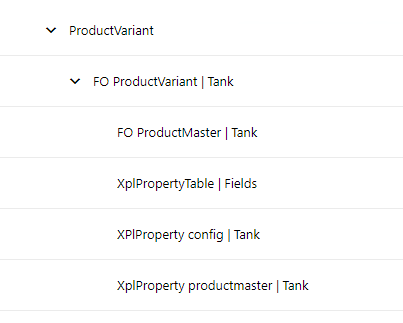
Product Variant Process Structure

Product Variant Example Process Structure View in Process Designer
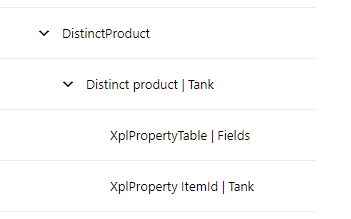
Example Distinct Product
The following sections provide examples of how you can map distinct products within Process Designer.
Assumptions
-
You are using a standard Microsoft Dynamics 365 F&O intercompany relationship to set up a customer and vendor. See Set up Cloud Connect for Microsoft Dynamics 365 F&O for more information.
-
The Property propertysetid is populated using the function GETURLARGUMENTVALUE in Design Center.
Setup
-
In Microsoft Dynamics 365 F&O, under Modules > Experlogix processing entities:
-
Add processing entity for table/entity XplPropertyTable.
-
Set the Add property set field for processing entity EcoResReleasedProductEntity to true.
-
On the processing entity EcoResReleasedProductEntity set the Field connection type to either Global configuration or Global configuration / company state.
-
-
In Microsoft Dynamics 365 F&O, navigate to Modules > Experlogix > Release product to company.
-
Set up the release of product variants to other companies. In the below example, product master T1 is used and any new product variant is released to company DEMF.
Distinct Product
Header - Distinct Product Details
|
Field |
Value |
|---|---|
|
Name |
productVariant |
|
Process integration |
Name of Microsoft Dynamics 365 F&OProcess integration. |
|
Template |
1000 |
|
Entity |
|
The template Item number 1000 above is an example of a distinct product that's already present in the Contoso sample database. Please change this value to one which is present in your Microsoft Dynamics 365 F&O instance.
Lines - Distinct Product Mapping
|
Name |
Field |
Data type |
Mapping type |
Properties |
Value |
Source |
Destination |
|---|---|---|---|---|---|---|---|
|
Item Number |
ItemNumber |
String |
NumberSeries |
ITEMUSMF |
|
itemnum |
|
Number series ITEMUSMF needs to setup as described in Set up Cloud Connect for Microsoft Dynamics 365 F&O.
XplPropertyTable
Header - XplPropertyTable Details
|
Field |
Value |
|---|---|
|
Name |
XplPropertyTable |
|
Process integration |
Name of Microsoft Dynamics 365 F&O Process integration. |
|
Entity |
|
Lines - XplPropertyTable Mapping
|
Name |
Field |
Data type |
Mapping type |
Value |
Source |
Destination |
|---|---|---|---|---|---|---|
|
SetId |
Property Set Id |
String |
Property |
propertysetid |
|
|
|
LineNum |
Line number |
Decimal |
NumberSeries |
detail |
|
|
|
FieldName |
Field name |
String |
Property |
fieldId |
|
|
|
EntityName |
Entity name |
String |
Constant |
SalesLine |
|
|
|
Value |
Value |
String |
Property |
fieldvalue |
|
|
XplProperty Itemid
Header - XplProperty Itemid Details
|
Field |
Value |
|---|---|
|
Name |
XplProperty itemid |
|
Process integration |
Name of Microsoft Dynamics 365 F&O Process integration. |
|
Entity |
|
Lines - XplProperty Itemid Mapping
|
Name |
Field |
Data type |
Mapping type |
Value |
Source |
Destination |
|---|---|---|---|---|---|---|
|
SetId |
Property Set Id |
String |
Property |
propertysetid |
|
|
|
LineNum |
Line number |
Decimal |
NumberSeries |
detail |
|
|
|
FieldName |
Field name |
String |
constant |
itemid |
|
|
|
EntityName |
Entity name |
String |
Constant |
SalesLine |
|
|
|
Value |
Value |
String |
Property |
|
|
itemnum |
The reason for having two process maps for the XplPropertyTable is that the configId is determined via a number series whereas the value for quantity and item number is determined via a Property.
Distinct Product Process Structure
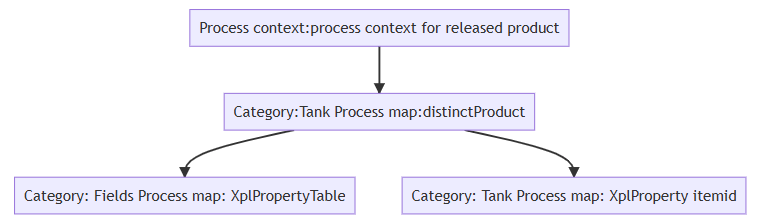
Product Variant Example Process Structure View in Process Designer