
The processing of a configuration in Microsoft Dynamics 365 F&O is executed completely in host system code. The main processing class is the XplConfiguratorProcessor while every entity / record that is processed uses a wrapper class that takes care of the actual database actions. This wrapper class is the XplEntityConnector, this class uses an XplConnectorHandler class that offers a number of hooks / events to allow custom programming.
Entity vs Record
A table record in the Microsoft Dynamics 365 F&O host system is a physical database entry that contains one or more values. An entity in the Microsoft Dynamics 365 F&O host system is like an updateable view that can consist of one or more different records. The processing of the individual records in the entity is programmed in the linked entity code and is normally part of the standard F&O models. Although an entity in the Microsoft Dynamics 365 F&O host system is quite different than a plain table record, Microsoft Dynamics 365 F&O can refer to both types using a single record buffer. Also all database actions (CRUDCRUD) can be executed using that buffer, regardless whether it is actually an entity or a table record.
Most Methods described below use a record as argument but they can also point to an entity.
Input
The JSON input file that contains the configuration data to be processed. The data normally consists of record / entity field values, but can also contain additional fields defined by the user. These name / value pairs are passed to the event handler and can be used for custom programming.
Chain of Command Extension
Microsoft Dynamics 365 F&O data processing happens recursively and execution is equal for each level. Processing can be broken down into the six steps below. The section below identifies hooks between each of these six steps that can be used for Chain of Command (CoC) custom programming.
-
Store JSONinput values.
-
Process lower level Reference relations.
-
Find existing record; if not found then initialize the record values using template / number series.
-
Validate the record fields.
-
Process the validated record.
-
Process lower level Composition relations.
-
OnAfterProcessEntity(Common record)
-
Methods
OnBeforeProcessEntity(Common valueRecord, XplRecordAction action)
XplRecordAction OnBeforeProcessEntity(Common valueRecord, XplRecordAction action)
Arguments:
-
valueRecord: The record is filled with the input values and foreignkey values of references.
-
recordAction: The default recordAction according to the input data.
Returns:
-
recordAction: The recordAction for further processing; normally the same as the input recordAction.
The method called before any database action on the record/entity is executed. This method allows a change to the default recordAction, e.g. delete the valueRecord and let the processor insert a new record again by changing the recordAction to Create.
OnAfterProcessEntity(Common record)
void OnAfterProcessEntity(Common record)
Arguments:
-
record: The record after the database action is executed and all composition relations are processed.
Returns:
-
None
The method called after the record / entity is completely executed, including all lower-level composition relations. Can be used to execute actions on the structure, e.g. calculate price, certify BOM / route, etc.
OnBeforeInsert(Common record, container fieldsValuesMap)
boolean OnBeforeInsert(Common record, container fieldsValuesMap)
Arguments:
-
record: The record is completely filled with the database or template values, number series, and the input values.
-
fieldsValuesMap: A container that contains a map of the additional field values.
Returns:
-
Boolean: If True, execution of this action continues. If False, execution is skipped.
The method called just before the actual record / entity insert or update execution and before the record is validated. This method allows additional database action to be performed, e.g. insert a BOM header just before a BOM version is inserted. It also enables the modification of the record. Modified fields are detected and taken into account in the validation portion. The additional fields and values in the fieldsValueMap allow the execution of any custom programming.
OnBeforeUpdate(Common record, container fieldsValuesMap)
boolean OnBeforeUpdate(Common record, container fieldsValuesMap)
Arguments:
-
record: The record is completely filled with the database or template values, number series, and the input values.
-
fieldsValuesMap: A container that contains a map of the additional field values.
Returns:
-
boolean : If True, execution of this action continues. If False, execution is skipped.
The method called just before the actual record / entity insert or update execution and before the record is validated. This method allows additional database action to be performed, e.g. insert a BOM header just before a BOM version is inserted. It also enables the modification of the record. Modified fields are detected and taken into account in the validation portion. The additional fields and values in the fieldsValueMap allow the execution of any custom programming.
[ExtensionOf(ClassStr(XplConnectorHandler))]
final class XplConnectorHandler_Extension
(
    public boolean OnBeforeInsert(Common record, container fieldsValuesMap)
        {
            Map     valuesMap = Map::create(fieldsValuesMap);
            str        myValue;

            switch (record.tableId)
            {
                case tableNum(CustTable):
                    CustTable customer = record as CustTable;
                    if (valuesMap.exists('XXX_MyCustomField'))
                    {
                        myValue = valuesMap.lookup('XXX_MyCustomField');
                        //...further custom processing
                    }
                    break;
            }

            return next OnBeforeInsert(record, fieldsValuesMap);
        }
}
OnBeforeDelete(Common record, container fieldsValuesMap)
boolean OnBeforeDelete(Common record, container fieldsValuesMap)
Arguments:
-
record: The record completely filled with values that are read from the database.
-
fieldsValuesMap: A container that contains a map of the additional field values.
Returns:
-
Boolean: If True, then execution of this action continues, if False then execution is skipped.
The method called just before record/entity deletion is executed. The additional fields and values in the fieldsValueMap allow the execution of any custom programming. The actual delete can be prevented by returning False.
OnAfterInsert(Common record, container fieldsValuesMap)
void OnAfterInsert(Common record, container fieldsValuesMap)
Arguments:
-
record: The record just after the database action was executed.
-
fieldsValuesMap: A container that contains a map of the additional field values.
Returns:
-
None
The method called just after the actual record /entity database action is executed. The record/entity field values and additional fields and values in the fieldsValueMap allow the execution of any custom programming.
OnAfterUpdate(Common record, container fieldsValuesMap)
void OnAfterUpdate(Common record, container fieldsValuesMap)
Arguments:
-
record: The record just after the database action was executed.
-
fieldsValuesMap: A container that contains a map of the additional field values.
Returns:
-
None
The method called just after the actual record/entity database action is executed. The record/entity field values and additional fields and values in the fieldsValueMap allow the execution of any custom programming.
OnAfterDelete(Common record, container fieldsValuesMap)
void OnAfterDelete(Common record, container fieldsValuesMap)
Arguments:
-
record: The record just after the database action was executed.
-
fieldsValuesMap: A container that contains a map of the additional field values.
Returns:
-
None
The method called just after the actual record / entity database action is executed. The record / entity field values and additional fields and values in the fieldsValueMap allow the execution of any custom programming.
Build Your Own Connector Handler
Instead of using the methods outlined in Chain of Command Extension for custom processing, you can create your own connector handler class. If such a class is linked to a processing entity then the standard XplConnectorHandler is skipped (including the CoC extension that you are using) and the new class is used instead.
The new handler class must implement the XplConnectorHandlerInterface and must contain all the methods described in that interface. A template for the new handler class can be found below:
    /// <summary>
    /// Code executed before the first record of a composition record set is executed
    /// </summary>
    /// <param name = "record">Record filled with the collected json values</param>
    public void OnBeforeProcessComposition(Common record)
    {
    }

    /// <summary
    /// Code executed before any processing takes place
    /// </summary>
    /// <param name = "record">Record filled with the collected json values</param>
    /// <param name = "action">The database action collected from the JSON input</param>
    /// <returns>The CRUD database action that will be executed</returns>
    public XplRecordAction OnBeforeProcessEntity(Common record, XplRecordAction action)
    {
        return action;
    }

    /// <summary>
    /// Code executed after the entity was processed, this includes any related data
    /// </summary>
    /// <param name = "record">The Record after the database action was executed</param>
    /// <param name = "action">The executed database action</param>
    public void OnAfterProcessEntity(Common record, XplRecordAction action)
    {
    }

    /// <summary>
    /// Code executed just before the database insert action, after the record was validated
    /// </summary>
    /// <param name = "record">The record that is going to be written</param>
    /// <param name = "fieldsValuesMap">All name / value pairs collected from the JSON input</param>
    /// <returns>True to continue with the insert action; False to skip the insert action</returns>
    public boolean OnBeforeInsert(Common record, container fieldsValuesMap)
    {
        return true;
    }

    /// <summary>
    /// Code executed after the database insert action
    /// </summary>
    /// <param name = "record">The record that was written</param>
    /// <param name = "fieldsValuesMap">All name / value pairs collected from the JSON input</param>
    public void OnAfterInsert(Common record, container fieldsValuesMap)
    {
    }

    /// <summary>
    /// Code executed just before the database update action, after the record was validated
    /// </summary>
    /// <param name = "record">The record that is going to be written</param>
    /// <param name = "fieldsValuesMap">All name / value pairs collected from the JSON input</param>
    /// <returns>True to continue with the update action; False to skip the update action</returns>
    public boolean OnBeforeUpdate(Common record, container fieldsValuesMap)
    {
        return true;
    }

    /// <summary>
    /// Code executed after the database update action
    /// </summary>
    /// <param name = "record">The record that was written</param>
    /// <param name = "fieldsValuesMap">All name / value pairs collected from the JSON input</param>
    public void OnAfterUpdate(Common record, container fieldsValuesMap)
    {
    }

    /// <summary>
    /// Code executed just before the database create or update action, after the record was validated
    /// </summary>
    /// <param name = "record">The record that is going to be written</param>
    /// <param name = "fieldsValuesMap">All name / value pairs collected from the JSON input</param>
    /// <returns>True to continue with the update action; False to skip the update action</returns>
    public boolean OnBeforeWrite(Common record, container fieldsValuesMap)
    {
        return true;
    }

    /// <summary>
    /// Code executed after the database create or update action
    /// </summary>
    /// <param name = "record">The record that was written</param>
    /// <param name = "fieldsValuesMap">All name / value pairs collected from the JSON input</param>
    public void OnAfterWrite(Common record, container fieldsValuesMap)
    {
    }

    /// <summary>
    /// Code executed just before the database delete action
    /// </summary>
    /// <param name = "record">The record that is going to be deleted</param>
    /// <param name = "fieldsValuesMap">All name / value pairs collected from the JSON input</param>
    /// <returns>True to continue with the delete action; False to skip the delete action</returns>
    public boolean OnBeforeDelete(Common record, container fieldsValuesMap)
    {
        return true;
    }

    /// <summary>
    /// Code executed after the database delete action
    /// </summary>
    /// <param name = "record">The record that was deleted</param>
    /// <param name = "fieldsValuesMap">All name / value pairs collected from the JSON input</param>
    public void OnAfterDelete(Common record, container fieldsValuesMap)
    {
    }

    /// <summary>
    /// Used to add additional fields to the process entity that are added to the entity metadata
    /// the given fields can be used in the configuration process and are returned in the fieldsValuesMap arguments
    /// use processEentity.createEntityFieldName
    /// </summary>
    /// <param name = "processEntity">The process entity record</param>
    public void addProcessEntityFields(XplProcessEntity  processEntity)
    {
    }

    /// <summary>
    /// Returns the root entity tables that the current record must be linked to.
    /// Whenever the returned entity is written in the configuration processor, an <c>XplMDLink</c> record is written.
    /// </summary>
    /// <param name = "rootTableName">The record / entity to find the entity link</param>
    /// <returns>A comma delimited string of table names</returns>
    public TableName linkToEntityName(TableName rootTableName)
    {
        return '';
    }
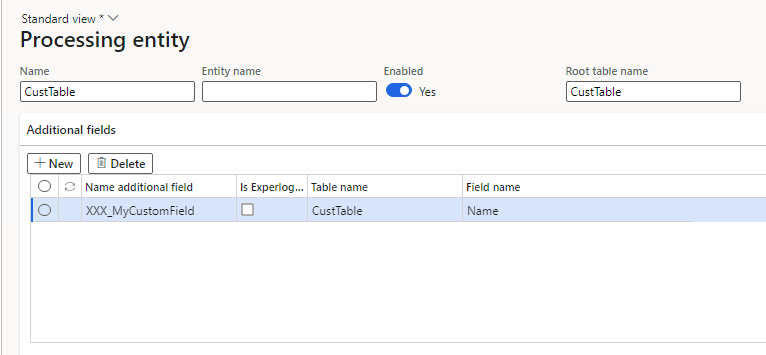
After you build the connector handler class, it must be added to one or more processing entities by adding the field Connector handler to the Processing entity page via the Personalize option.
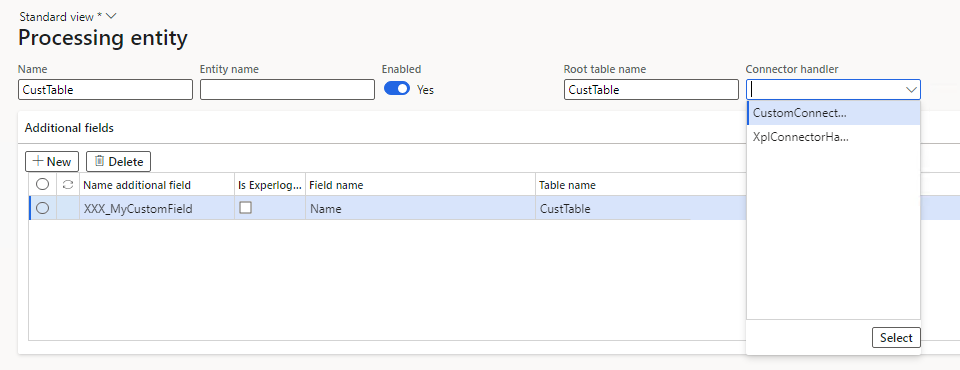
The addProcessEntityFields(XplProcessEntity processEentity) method allows you to add additional fields to one or more processing entities, skipping the need to add them manually in the Processing entity page.
addProcessEntityFields(XplProcessEntity processEentity)
void addProcessEntityFields(XplProcessEntity processEentity)
Arguments:
-
processEentity: The XplProcessEntity record to add the fields to.
Use processEentity.createEntityFieldName(customFieldName, domainTable, domainField) to add the fields. The field will be added when the ProcessEntity is initialized.
///<summary>
///Method to add hardcoded additional fields to process entities,
///A map of name / value pairs of additional fields linked to the entity is passed to the relevant hooks
/// use processEentity.createEntityFieldName
///</summary>
///<param name = "processEentity">The record / entity to add the fields to</param>

public void addProcessEntityFields(XplProcessEntity processEentity)
{
    XplProcessEntityField entityField;

    ttsbegin;

    delete_from entityField where entityField.ProcessEntity == processEentity.RecId && entityField.IsXplField;
    switch (processEentity.RootTable)
    {
        case 'CustTable":
            processEentity.createEntityFieldName('XXX_MyCustomField', 'CutTable', 'Name');
            break;
        }
        ttscommit;
    }