CloudConnect Microsoft Dynamics 365 CE supports the standard Microsoft Dynamics 365 CE revise process. If the standard process does not suffice, some Microsoft Dynamics 365 CE clients use a custom revise process. Experlogix supports this, but it does require custom development from the partner/client.
Assumptions / limitations
For correct copying configuration work:
-
You must first save the destination record. Therefore, custom API must be called twice with different values for the processStates parameter:
-
The first call should be made synchronously with processStates=false
-
The second call should be made asynchronously with processStates=true
-

-
If a root record has child records that are used in the configuration, those child records must also be saved in Dataverse (the transaction should be committed to the database) before the configuration copy operation is executed.
Responsibilities
Experlogix
-
Experlogix is responsible for calling the integration API from Microsoft Dynamics 365 CE.
-
Experlogix is responsible for copying a configuration and creating a process state.
-
Experlogix is responsible for informing the calling application whether the copy was successful or not.
Partner/client
-
Partner/client is responsible for copying the root-record and related records to the revised quote. Ensure that all records are copied and saved in Dataverse before starting the next step. (call xpl_CopyConfiguration)
-
Partner/client is responsible for the calls to the xpl_CopyConfiguration endpoint.
-
Partner is responsible for error handling based on the response from the copy configuration endpoint.
Authentication and Authorization
Please read this documentation from Microsoft for information on the requirements for Bearer token-based Authentication and Authorization.
Request URL
{instance_url}/api/data/{web_api_version}/xpl_CopyConfiguration
HTTP method: POST
Content-type: application/json
Example: https://myinstance.crm4.dynamics.com/api/data/v9.2/xpl_CopyConfiguration
Request Parameters
The request data fields form the body of the request. All request parameters are required.
|
Unique Name |
Type |
Description |
|---|---|---|
|
sourceEntity |
String |
Contains name of the source entity. |
|
sourceRecordId |
String |
Contains id of the source record. |
|
destinationEntity |
String |
Contains name of the destination entity. |
|
destinationRecordId |
String |
Contains id of the destination record. |
|
replace |
Boolean |
If true, overwrites existing configuration. |
|
processStates |
Boolean |
If true, indicates that process status be derived. |
HTTP Status Codes
|
HTTP Status |
Description |
|---|---|
|
200 OK |
Indicates that the request has succeeded. |
|
400 Bad Request |
The request could not be understood by the server due to incorrect syntax. |
|
401 Unauthorized |
Indicates that the request requires user authentication information. |
|
403 Forbidden |
Unauthorized request. The client does not have access rights to the content. |
|
404 Not Found |
The server can not find the requested resource. |
|
500 Internal Server Error |
The server encountered an unexpected condition that prevented it from fulfilling the request. |
Response Data
|
Unique Name |
Type |
Description |
|---|---|---|
|
response |
string |
Contains response information. |
Potential Response Messages
|
HTTP Status |
Response/Error Message |
|---|---|
|
200 OK |
"response": "{ "code": "204", "message": "Copy was successful" }" |
|
304 Not Modified |
"response": "{ "code": "304", "message": "Copy not executed. Source configuration does not exists or the destination may not be overwritten" }" |
|
400 Bad Request |
"message" : "{"SourceEntity":["The SourceEntity field is required."],"SourceRecordId":["The SourceRecordId field is required."],"DestinationEntity":["The DestinationEntity field is required."],"DestinationRecordId":["The DestinationRecordId field is required."]}" |
|
404 Not Found |
"message": "Configuration settings or ConnectionId not found" |
Power Automate
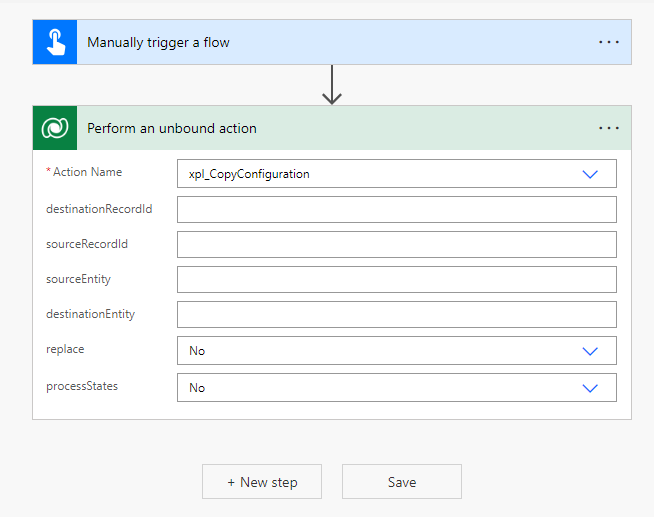
An unbound action can be used for testing the Copy Configuration functionality. Please see Microsoft's documentation on unbound actions. The unbound action is called xpl_CopyConfiguration.