
The Copy Configuration endpoint for Microsoft Dynamics 365 CE copies the Experlogix configuration and process state from the source record to the destination record of the corresponding Entity. You can use this endpoint to copy a configuration attached to an existing record and connect it to another record of the same type. This reduces the time needed to create a quote, as an existing configuration can be copied and connected to a related record.
This article provides an overview of the Microsoft Dynamics 365 CE endpoint request, response and code details.
Prerequisites and Limitations
The following prerequisites and limitations apply to this endpoint:
-
As of now, it is only possible to have the same source and destination entity.
-
The copy configuration API can only be called after the destination and related records are committed to Microsoft Dynamics 365 CE.
Experlogix and Client/Partner Responsibilities Overview
This section outlines the specific tasks that Experlogix and the client or partner must perform. It clarifies the roles and actions required for successful integration and error handling.Experlogix and the client's or partner's responsibilities are listed below.
Experlogix Responsibilities
-
Call the Integration API from Microsoft Dynamics 365 CE
-
Copy a configuration and create a process state
-
Inform the calling application whether the copy was successful
Client or Partner Responsibilities
-
Copy the root record and related records
-
Call the endpoint
-
Error handling based on the response from the copy configuration endpoint
Authorization and Authentication
The copy configuration endpoint uses Bearer token authorization.
For information on authorization and authentication, visit the Microsoft Authentication and Authorization page.
API Endpoint Reference: Copy Configuration Endpoint
Request Overview
The following are the Copy Configuration endpoint request details:
|
Request |
Details |
|---|---|
|
URL |
{instance_url}/API/data/{web_api_version}/xpl_CopyConfiguration |
|
HTTP method |
POST |
|
Content-type |
application/JSON |
|
Example URL |
https://myinstance.crm4.dynamics.com/api/data/v9.2/xpl_CopyConfiguration |
Request Parameters
|
Unique Name |
Type |
Description |
|---|---|---|
|
sourceEntity |
String |
Name of the source entity. |
|
sourceRecordId |
String |
Id of the source record. |
|
destinationEntity |
String |
Name of the destination entity. |
|
destinationRecordId |
String |
Id of the destination record. |
|
replace |
Boolean |
Overwrite existing configuration. |
|
processStates |
Boolean |
If the process status should be derived. |
HTTP Status Codes
|
HTTP Status |
Description |
|---|---|
|
200 OK |
Request successful. |
|
400 Bad Request |
Request was unsuccessful due to incorrect syntax. |
|
401 Unauthorized |
User authentication information is required. |
|
403 Forbidden |
Unauthorized request. The client does not have access rights to the content. |
|
404 Not Found |
The server can not find the requested resource. |
|
500 Internal Server Error |
The server encountered an unexpected condition that prevented it from fulfilling the request. |
Response Overview
The following is the response received after using the Copy Configuration endpoint:
|
Unique Name |
Type |
Description |
|---|---|---|
|
response |
String |
Contains response information. |
Response Data and Error Codes
The following response data or error codes are received, depending on the request:
|
HTTP Status |
Response / Error Message |
|---|---|
|
200 OK |
"response": "{ "code": "204", "message": "Copy was successful" }" |
|
304 Not Modified |
"response": "{ "code": "304", "message": "Copy not executed. Source configuration does not exists or the destination may not be overwritten" }" |
|
400 Bad Request |
"message" : "{"SourceEntity":["The SourceEntity field is required."],"SourceRecordId":["The SourceRecordId field is required."],"DestinationEntity":["The DestinationEntity field is required."],"DestinationRecordId":["The DestinationRecordId field is required."]}" |
|
404 Not Found |
"message": "Configuration settings or ConnectionId not found" |
External Testing Tools
The Copy Configuration endpoint can be tested using the following external tools.
Testing with Power Automate Unbound Action
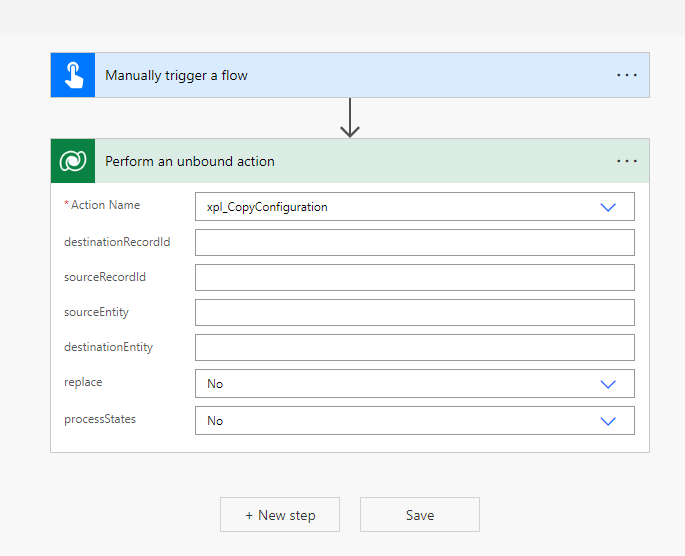
Use Power Automate to test the Copy Configuration functionality. For more information on Unbound Action, see Unbound Actions. The Unbound Action is called xpl_CopyConfiguration. See the following example Power Automate image:
Procedures
Copy Configurations
You can copy configurations within the following entities:
|
Integration |
Configure |
Outbound |
|---|---|---|
|
Microsoft Dynamics 365 CE |
|
Any table or entity |
|
Microsoft Dynamics 365 F&O |
|
Any table or entity |
|
Microsoft Dynamics 365 BC |
|
Any table or entity |
|
Salesforce |
|
Any table or entity |
In the following example, we copy a configuration from a Quote to an Order.
-
Open Swagger and select the Configuration endpoint.
-
Select the POST method Copy a configuration set by record.
-
Select Try it out to enable parameter input.
-
Input the required parameters, including the Connection ID.
-
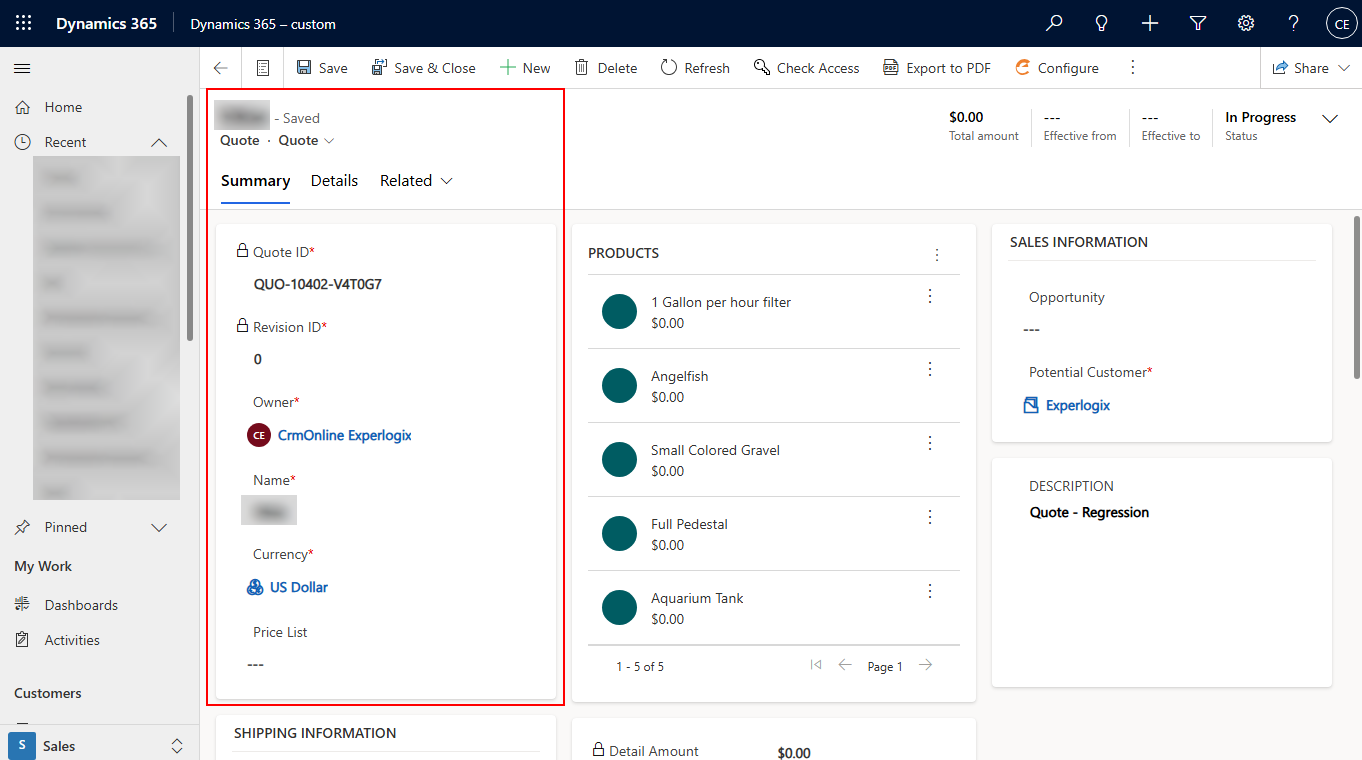
In Microsoft Dynamics 365 CE, select Configure and create and configure a Quote.
-
In Swagger, update the entity name and record ID parameters with the Quote details you just created.
-
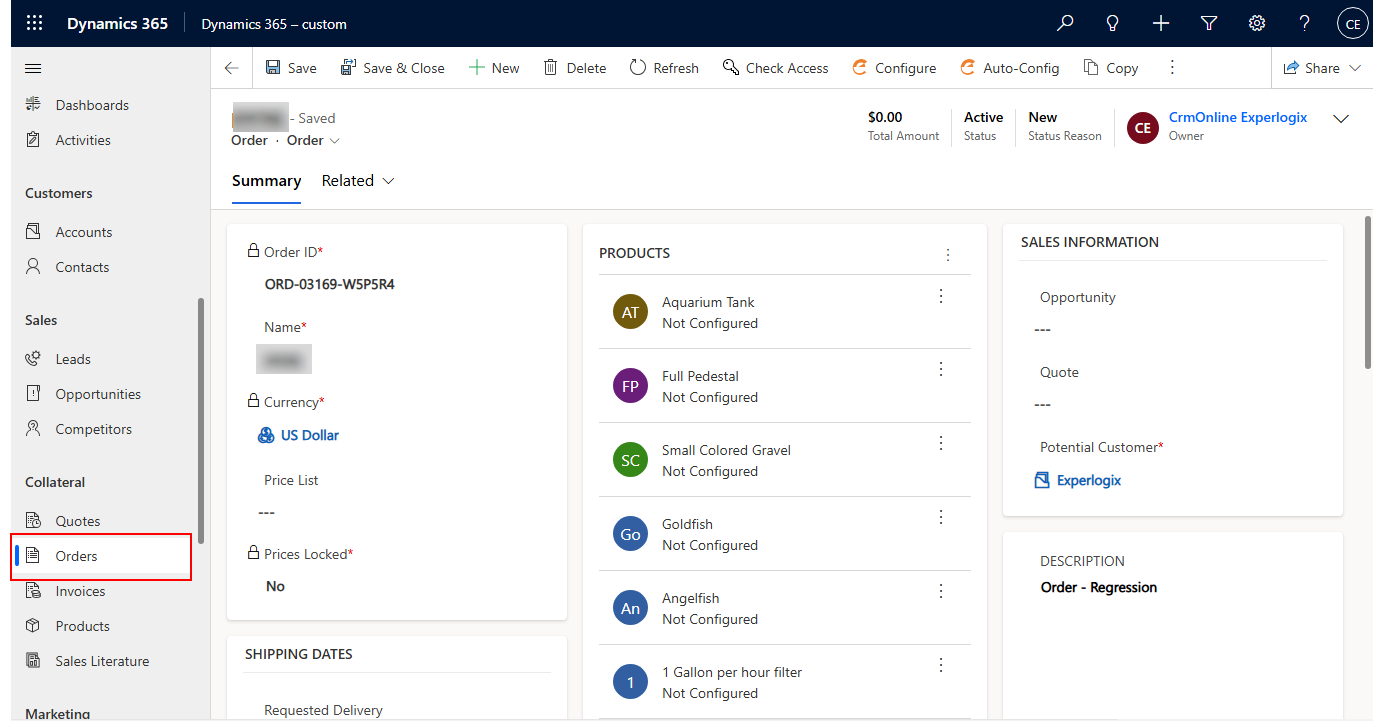
In Microsoft Dynamics 365 CE, select Configure and create and configure an Order.
-
In the Swagger interface, add the parametersof the Order entity name and record ID in the Configuration endpoint parameters.
-
Select the Execute button.