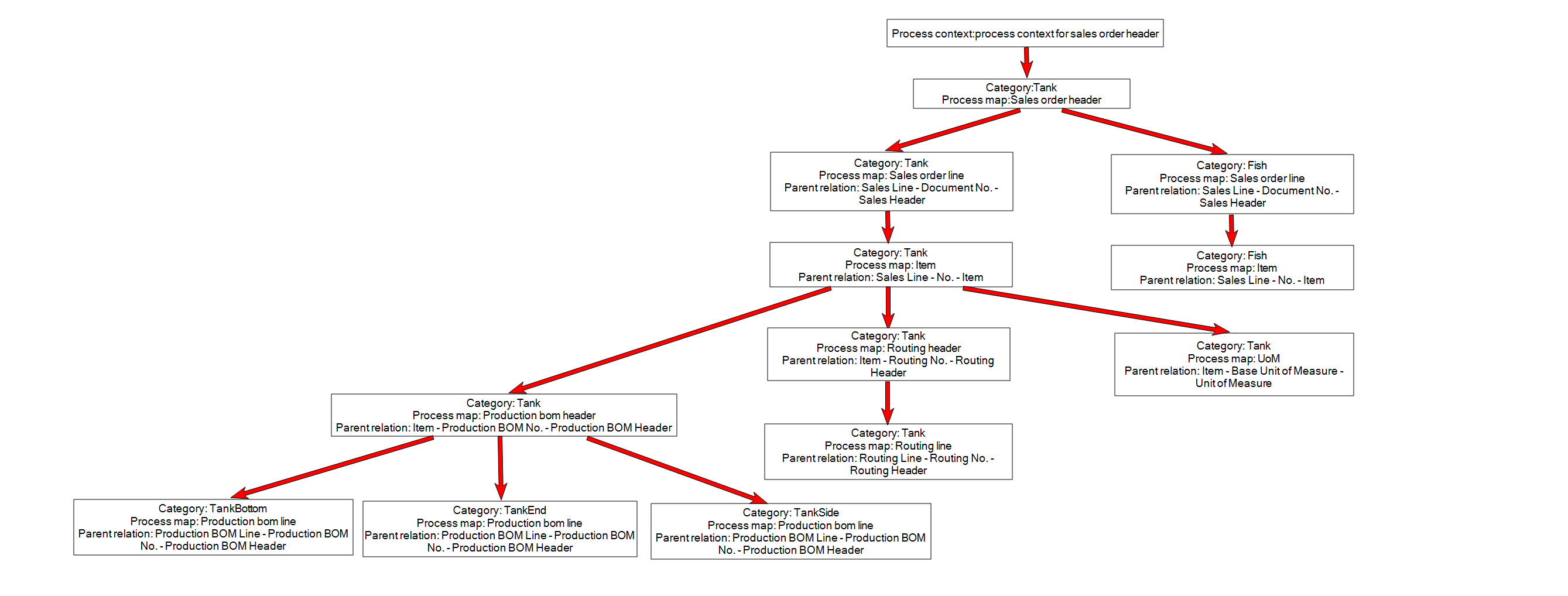
A new Sales Order can be created by adding values in the Item fields. This section provides the Item fields that can be updated for creating a Sales Order.
Process Context
The following table provides the Process Context details for the example sales order item:
|
Field |
Value |
|---|---|
|
Name |
Any friendly name |
|
Process integration |
Name of Microsoft Dynamics 365 BC Process integration |
|
Entity |
36 |
Process Map
The following details are added to the Process Map.
Sales Order Header - 36
The following table provides the Sales Order header details:
|
Field |
Value |
|---|---|
|
Name |
Sales Order Header |
|
Process integration |
Name of Microsoft Dynamics 365 BC Process integration |
|
Entity |
36 |
|
Template |
|
|
Option Link Property |
|
The following table provides the Sales Order Lines Mapping details:
|
Name |
Field |
Data Type |
Mapping Type |
Value |
|---|---|---|---|---|
|
Document Type |
1 |
String |
Property |
|
|
No |
3 |
String |
Property |
|
Sales Order Line - 37
The following table provides the Sales Order line headers details:
|
Field |
Value |
|---|---|
|
Name |
Sales Order Line |
|
Process integration |
Name of Microsoft Dynamics 365 BC Process integration |
|
Entity |
37 |
|
Template |
|
|
Option Link Property |
|
The following table provides the Sales Order Lines Mapping details:
|
Name |
Field |
Data Type |
Mapping Type |
Value |
|---|---|---|---|---|
|
Document Type |
1 |
String |
Property |
|
|
Document No |
3 |
String |
Property |
|
|
Line No |
4 |
Integer |
Number Series |
Detail |
|
Type |
5 |
String |
Constant |
Item |
|
No. |
6 |
String |
Constant |
1 |
|
Quantity |
15 |
Decimal |
Property |
Quantity |
|
Unit Price |
22 |
Decimal |
Property |
Price |
The Name 'No' in the Sales Order Lines Mapping is a workaround to put a constant value of 1 in the document. Microsoft Dynamics 365 BC requires field '6' or 'No' to be validated; therefore it needs to be included in the Process Map. This will be resolved in a future release so that it is done automatically.
numberseries:detail
Use numberseries: detail for fields on detail records that require processor-managed numbering.
-
Automatic assignment of a unique number to the configured detail-record field.
-
Applicable to master-detail scenarios, such as Sales Orders and Sales Lines.
-
Generated number returned in the process-state for use in subsequent process steps.
-
Numbering continuation from the highest existing value for the configured field.
Migration details
Both numberseries:autoand numberseries:detail trigger this behavior.
Item - 27
The following table provides the header details:
|
Field |
Value |
|---|---|
|
Name |
Item |
|
Process integration |
Name of Microsoft Dynamics 365 BC Process integration |
|
Entity |
27 |
|
Template |
|
|
Option Link Property |
|
The following table provides the Line Mapping details:
|
Name |
Field |
Data type |
Mapping type |
Value |
|---|---|---|---|---|
|
No. |
1 |
String |
NumberSeries |
ITEM |
|
Description |
3 |
String |
Property |
Description |
|
Gen. Prod. Posting Group |
91 |
String |
Constant |
Retail |
|
Tax Group Code |
98 |
String |
Constant |
Furniture |
|
Inventory Posting Group |
11 |
String |
Constant |
Resale |
UoM - 27
The following table provides the header details:
|
Field |
Value |
|---|---|
|
Name |
UoM |
|
Process integration |
Name of BC Process integration |
|
Entity |
204 |
|
Template |
|
|
Option link property |
|
The following table provides the Line Mapping details:
|
Name |
Field |
Data type |
Mapping type |
Value |
|---|---|---|---|---|
|
Code |
1 |
String |
Constant |
PCS |
Production BOM header - 99000771
The following table provides the header details:
|
Field |
Value |
|---|---|
|
Name |
Item |
|
Process integration |
Name of Microsoft Dynamics 365 BC Process integration |
|
Entity |
99000771 |
|
Template |
|
|
Option Link Property |
|
The following table provides the lines mapping details:
|
Name |
Field |
Data Type |
Mapping Type |
Value |
|---|---|---|---|---|
|
No |
1 |
String |
NumberSeries |
PRODBOM |
|
Description |
10 |
String |
Property |
Description |
|
Status |
45 |
String |
Constant |
Certified |
|
Unit of Measure Code |
21 |
String |
Constant |
PCS |
Production BOM line - 99000772
The following table provides the header details:
|
Field |
Value |
|---|---|
|
Name |
Item |
|
Process integration |
Name of Microsoft Dynamics 365 BC Process integration |
|
Entity |
99000772 |
|
Template |
|
|
Option Link Property |
|
The following table provides the lines mapping details:
|
Name |
Field |
Data Type |
Mapping Type |
Value |
|---|---|---|---|---|
|
Production BOM No |
1 |
String |
Property |
|
|
Version Code |
3 |
String |
Property |
|
|
Line No. |
2 |
Integer |
NumberSeries |
Auto |
|
Type |
10 |
String |
Constant |
Item |
|
No |
11 |
String |
Property |
ERP_ItemNo |
|
Quantity Per |
45 |
Decimal |
Property |
Quantity |
Routing header - 99000763
The following table provides the header details:
|
Field |
Value |
|---|---|
|
Name |
Item |
|
Process integration |
Name of Microsoft Dynamics 365 BC Process integration |
|
Entity |
99000763 |
|
Template |
|
|
Option Link Property |
|
The following table provides the template lines mapping details:
|
Name |
Field |
Data Type |
Mapping Type |
Value |
|---|---|---|---|---|
|
No |
1 |
String |
NumberSeries |
ROUTING |
|
Type |
21 |
String |
Constant |
Parallel |
|
Status |
20 |
String |
Constant |
Certified |
|
Description |
2 |
String |
Property |
Description |
Routing line - 99000764
The following table provides the template header details:
|
Field |
Value |
|---|---|
|
Name |
Item |
|
Process integration |
Name of Microsoft Dynamics 365 BC Process integration |
|
Entity |
99000764 |
|
Template |
|
|
Option Link Property |
|
The following table provides the template lines mapping details:
|
Name |
Field |
Data type |
Mapping type |
Value |
|---|---|---|---|---|
|
Routing No |
1 |
String |
Property |
|
|
Version Code |
2 |
String |
Property |
|
|
Operation No |
4 |
String |
NumberSeries |
auto |
|
No |
8 |
String |
Property |
ERP_ItemNo |
|
Setup Time |
12 |
Decimal |
Property |
ERP_SetupTime |
|
Run Time |
13 |
Decimal |
Property |
ERP_MachineTime |
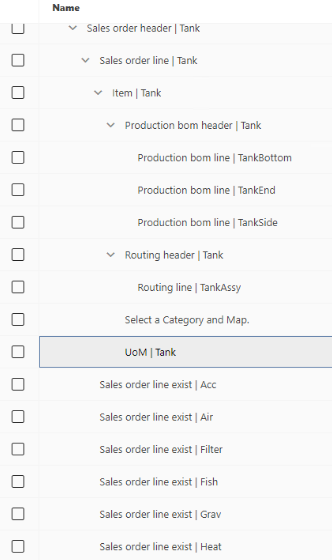
Process Structure
The following image displays the process structure in Process Designer:
The following diagram displays the setup of the process structure for the Aquarium demo database.