
Integrating Experlogix with Microsoft Dynamics 365 CE allows you to manage and automate tasks by scheduling API entities, which specify how and when to perform actions. This new functionality enhances project task management by integrating with the CE Processor, ensuring efficient processing and accurate status reporting. You can configure scheduling entities, providing greater control and customization. Compared to previous manual methods, this API-based scheduling offers seamless integration, improved task management, and enhanced user control, significantly upgrading efficiency and automation.
Configuring the Scheduling Entities Setting in Experlogix
The Scheduling Entities setting allows users to specify and manage scheduling API entities. This feature provides enhanced control over scheduling configurations. The Microsoft Dynamics 365 CE Processor now integrates with schedule API entities, enhancing project task management based on the new settings. This update ensures efficient processing and accurate status reporting for project records within the Microsoft Dynamics 365 CE system.
-
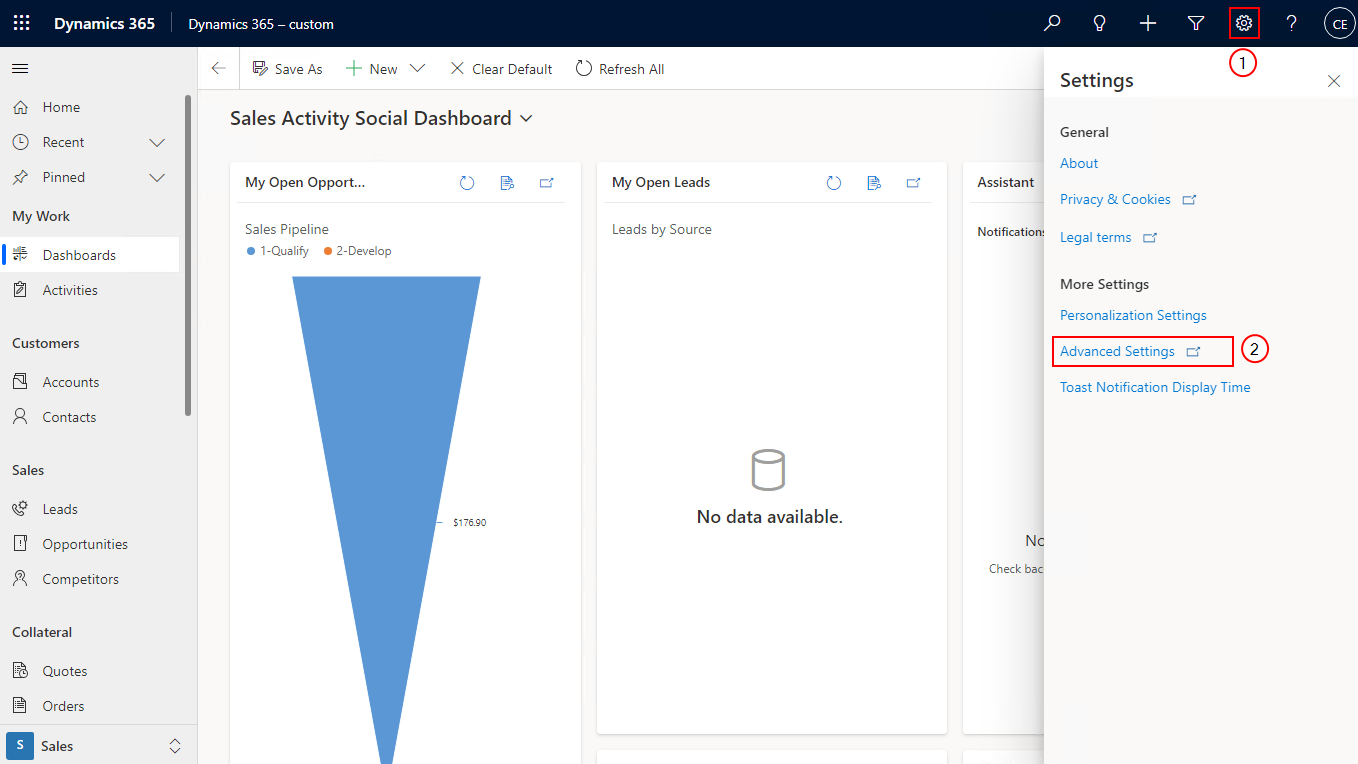
On the Microsoft Dynamics 365 CE home pageselect the Settings icon.
-
Select Advanced Settings.
-
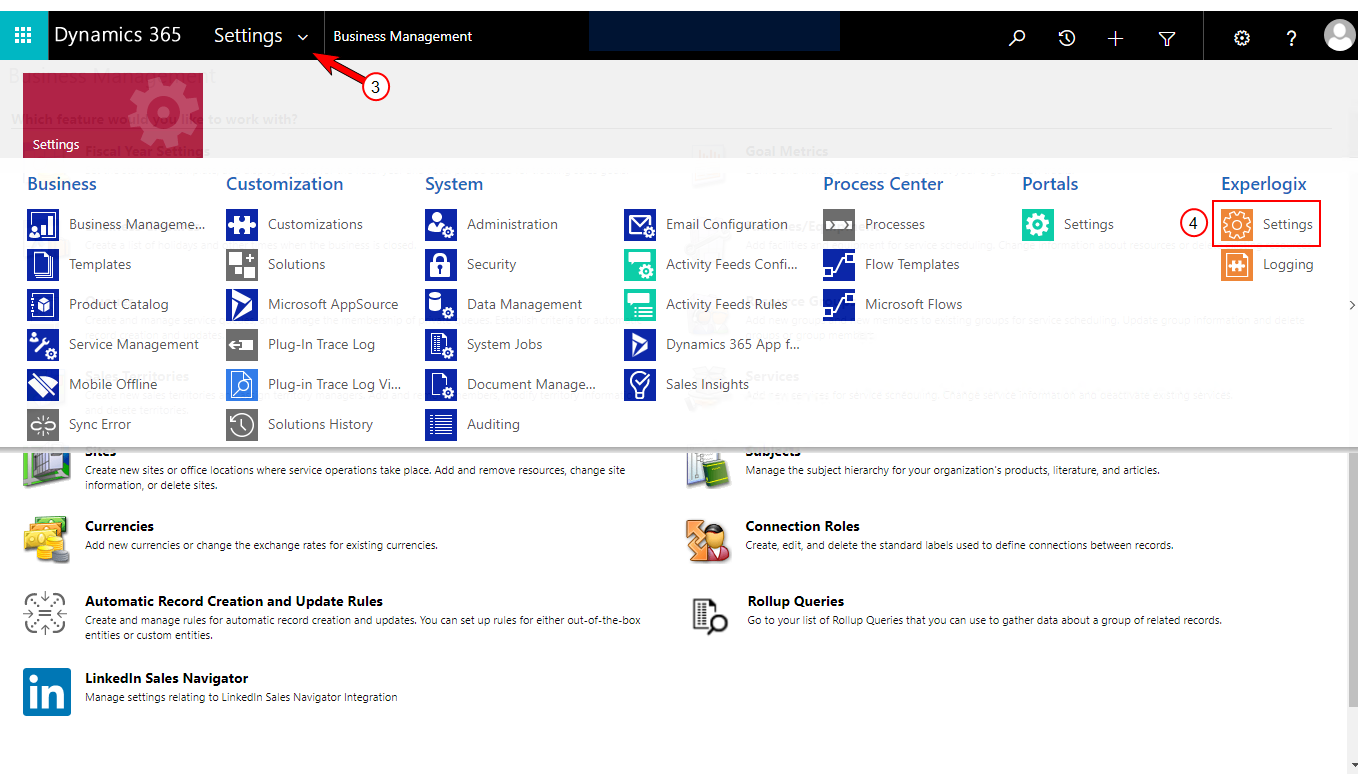
Select the Settings dropdown arrow at the upper-left corner to view the Settings option.
-
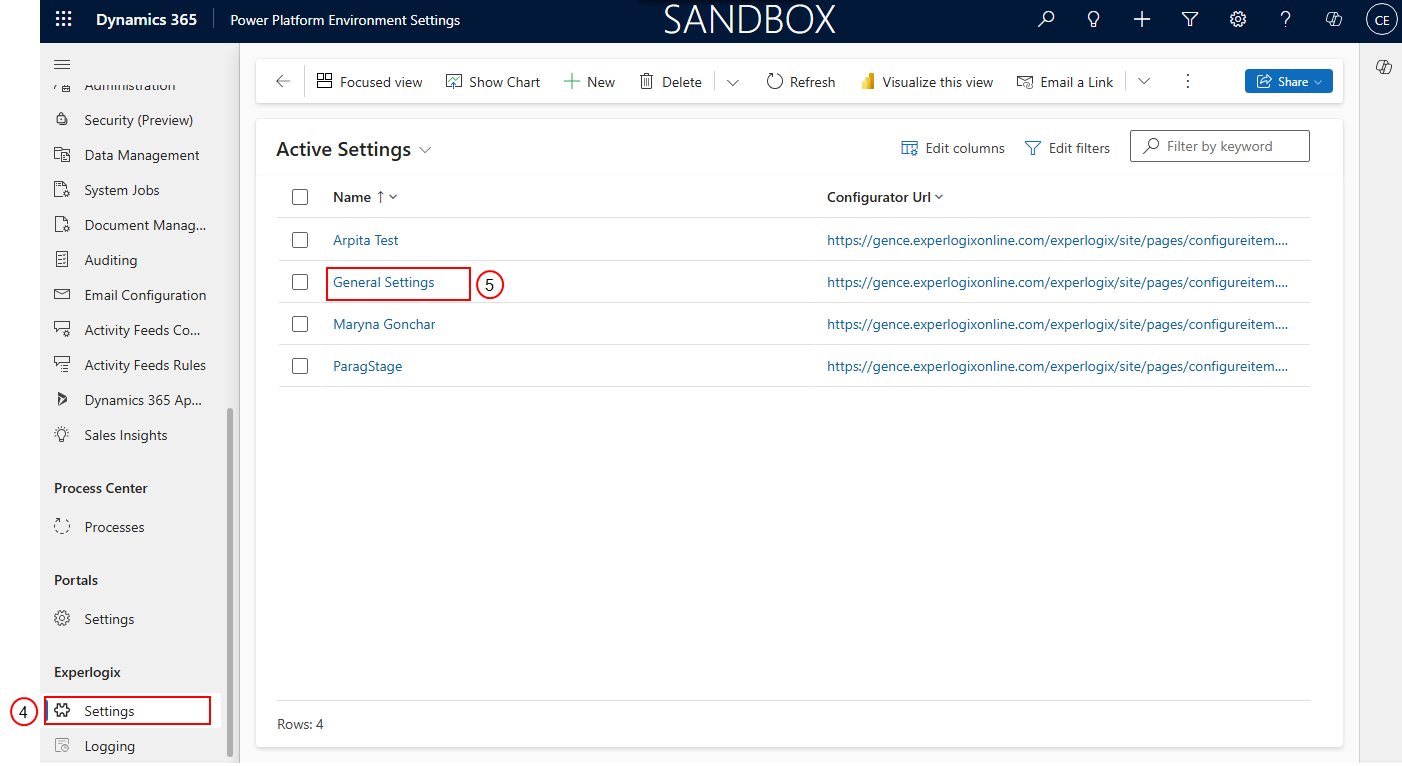
Under the Experlogix column, select Settings.
-
Select General Settings.
-
Select Advanced.
-
Select the Enable the usage of Project Schedule APIs field and select No.
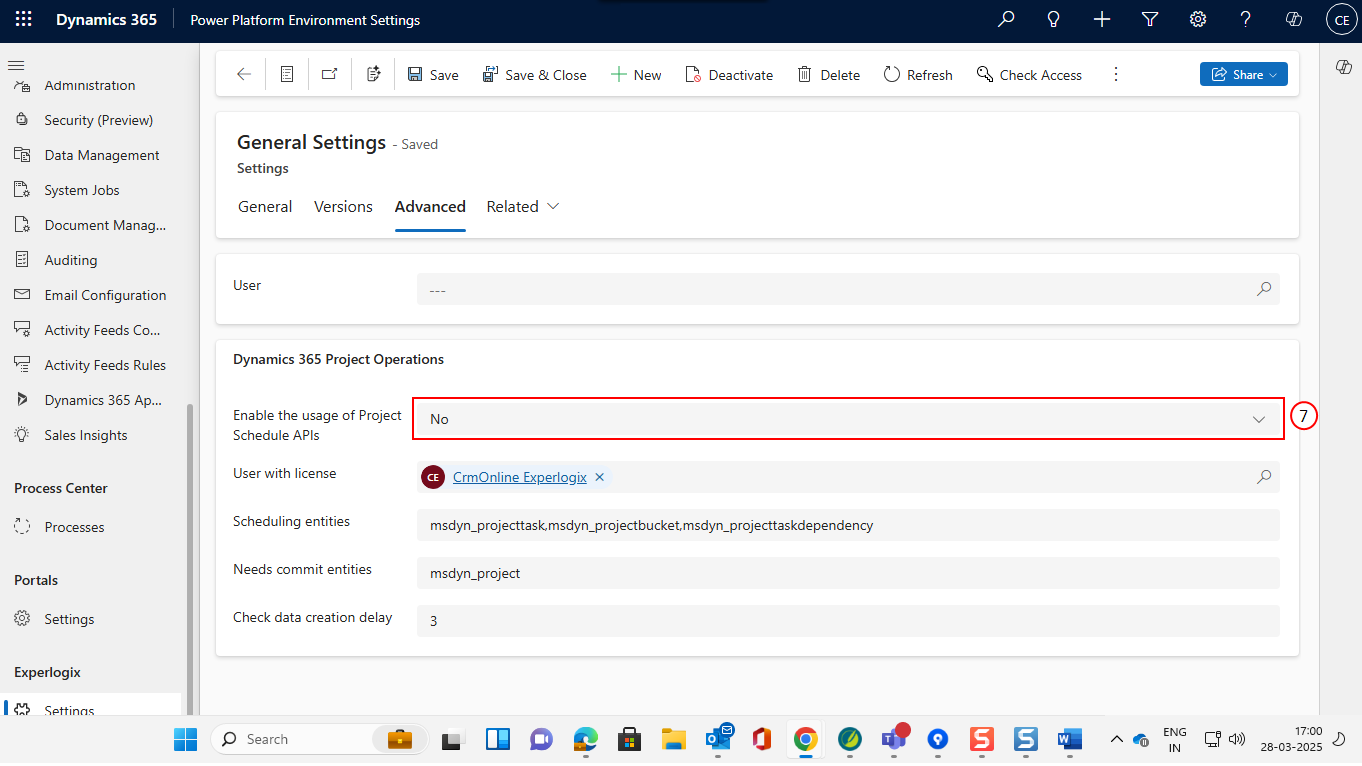
You can only update the Scheduling entity field when you select this value No. After updating the value, select Yes to lock the field.
-
Select the Scheduling entities field and modify the value.
Separate the scheduling API entities by commas per Microsoft documentation.
-
Select Save.
Enhanced scheduling with Schedule API entities in Microsoft Dynamics 365 CE
The Microsoft Dynamics 365 CE Processor now supports the Schedule API Entities setting, enabling efficient scheduling API calls. This enhancement streamlines the configuration for processing documents like quotes, quote details, projects, and project tasks. After creating a project record, the process-state returns to the integration API with a processing status. This feature provides specific actions for managing projects and project tasks, enhancing overall document processing efficiency. The following is a list of entities that are supported.
|
Field |
Description |
|---|---|
|
Project |
msdyn_project |
|
Project Task |
msdyn_projecttask |
|
Project Task Dependency |
msdyn_projecttaskdependency |
|
Resource Assignment |
msdyn_resourceassignment |
|
Project Bucket |
msdyn_projectbucket |
|
Project Team Member |
msdyn_projectteam |
|
Project Checklists |
msdyn_projectchecklist |
|
Project Label |
msdyn_projectlabel |
|
Project Task to Label |
msdyn_projecttasktolabel |
|
Project Sprint |
msdyn_projectsprint |
Reporting Process-State to Integration API
When encountering a Needs commit entity, the Microsoft Dynamics 365 CE Processor now reports the process state to the integration API with a processing status. This enhancement ensures the msdyn_project record is available in the schedule API, facilitating processing and integration.
-
Repeat steps 1 to 6 under Configuring the Scheduling Entities Setting in Experlogix.
-
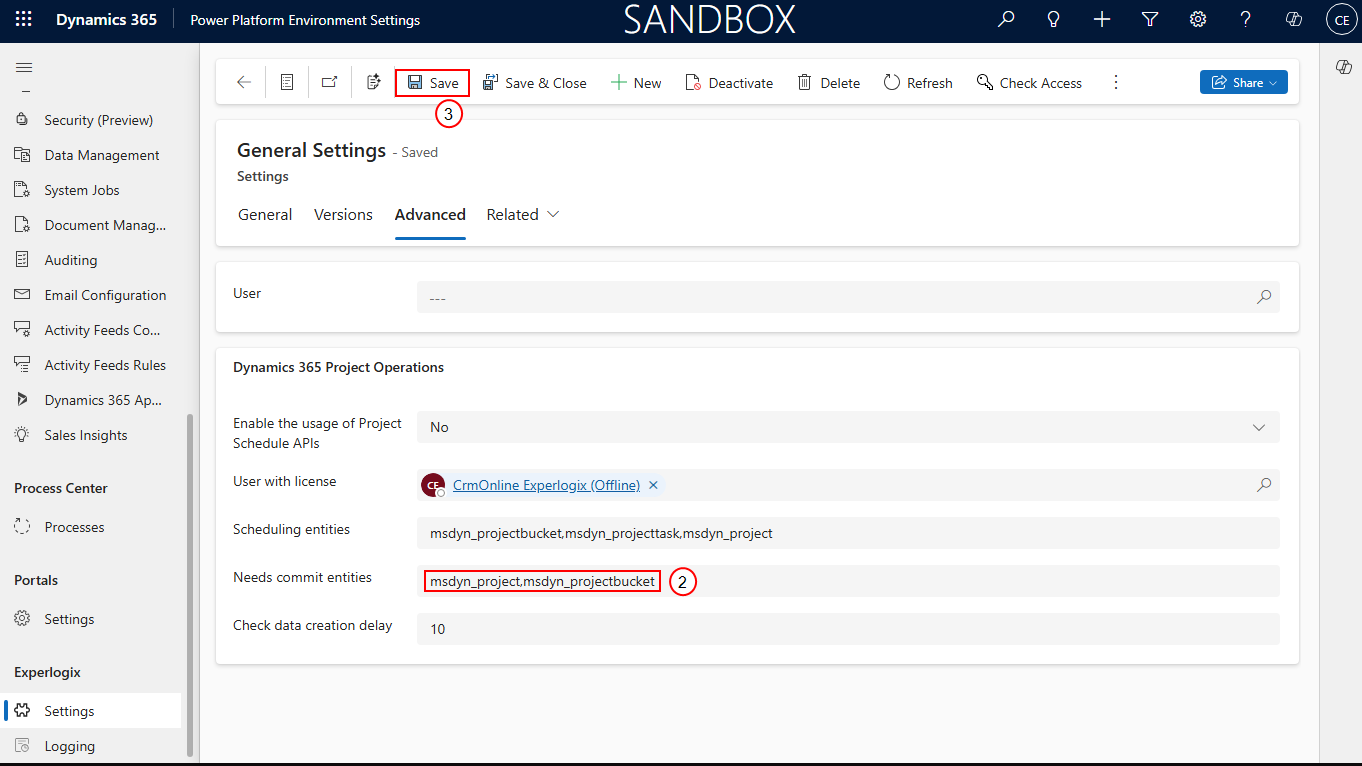
In the Needs commit entities field, add the Schedule API entities separated by a comma.
-
Select Save.
Integrating Microsoft Dynamics 365 CE Processor with Schedule API Entities for Enhanced Project Task Management
The Microsoft Dynamics 365 CE Processor now supports the new setting Schedule API entities to call the schedule API. This enhancement includes configuration for processing documents such as quotes, quote details, projects, and project tasks. After creating a project record, the process-state is returned to the integration API with a processing status, and new documents are received with specific actions for projects and project tasks.