
This page helps you optimize processor performance by configuring various limits and settings within Salesforce and Experlogix. By optimizing performance, your processor will be able to handle large configurations and environments with numerous automations. Optimization also ensures smoother performance and reduces the likelihood of hitting Salesforce governor limits, ultimately enhancing the efficiency of your Salesforce and Experlogix applications.
Salesforce Governor Limits Overview
Salesforce applies certain limitations to each Apex transaction. Some limits apply across the entire environment, while others are specific to each namespace (separate limits for each package). Shared limits are shared with customers' existing customizations and automations, which can affect the processor.
Shared Limits
-
The total heap size must not exceed 6MB.
-
The maximum CPU time cannot exceed 10 seconds.
Per Namespace Limits
-
The total number of SOQL(Salesforce Object Query Language) queries issued cannot exceed 100.
-
The total number of DML(Data Manipulation Language) statements issued cannot exceed 150.
-
The total number of records processed as a result of DML statements cannot exceed 10,000.
Processor Tuning and Parameters Overview
You can tune a set of processor parameters in the subscriber's org. These parameters help tune the processor for large configurations or environments with many automations.
How to Control Processor Parameters
-
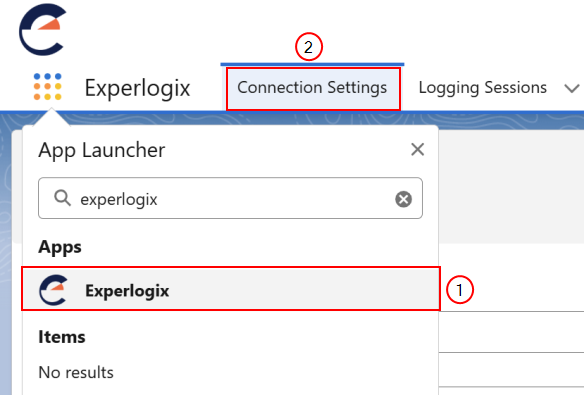
Using the App Launcher, navigate to the Experlogix application.
-
Select the Connection Settings tab.
The Processor Settings display.
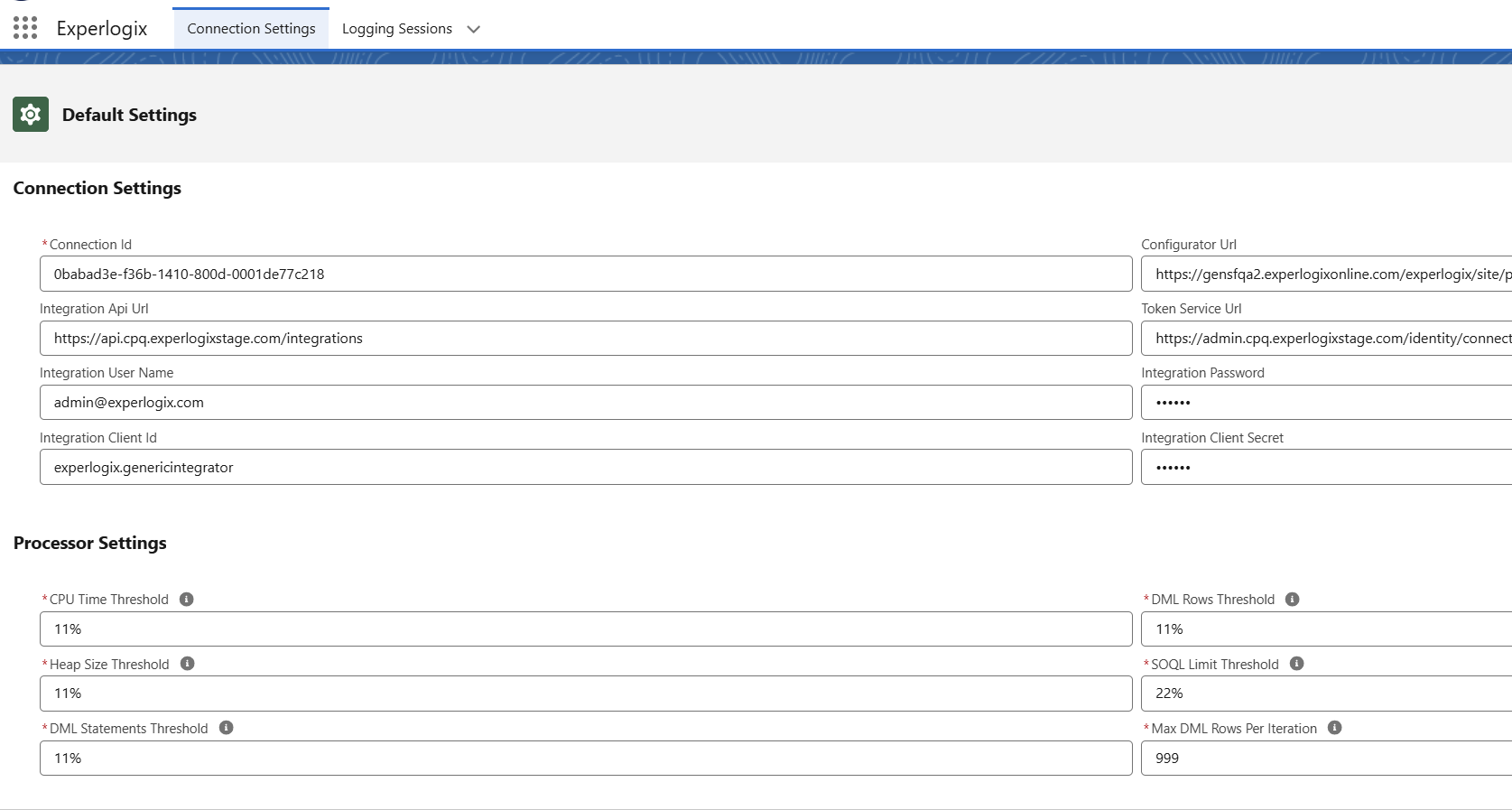
This table details the available Salesforce permission sets, including the specific permissions granted to each role.
Process Parameters
|
Parameter |
Description |
|---|---|
|
CPU Time |
Controls the amount of CPU time consumed during the preparation (Reader) stage. The CPU time limit is shared among all namespaces, so existing customer automation and customizations can affect it. If CPQ throws a CPU time limit-related error while saving the configuration, reduce the limit. |
|
Heap Size |
Large process documents might consume a lot of heap size, especially when using templates and source/destination functionalities. The heap limit is a shared limit, so existing customer customizations and automations must be accounted for when setting the heap size.. Reducing the limit might cause the processor to parse the document partially and reply to CPQ with a partially processed document, reducing the required heap size. The current limit for incoming process documents is 3MB-3.5MB. |
|
DML Statements |
The DML statements limit is exclusive to the Experlogixnamespace. It is unlikely to be hit unless the process document contains over a hundred object types. |
|
DML Rows |
The DML rows limit is exclusive to the Experlogixnamespace. The limit is 10,000 for synchronous execution, which covers most process documents. With such large documents, the heap size limit is more likely to be hit. |
|
DML Rows per Iteration |
This setting is for the processor's internal iterations. It helps deal with specific situations where one level of objects might depend on another. If a node at a certain level cannot acquire the parent node's ID to build the reference, it is pushed to a higher level, potentially increasing the number of levels to over 150, which can lead to hitting the DML statements limit. Setting this parameter to 1 makes the processor work in serial mode (processing nodes one by one without applying the elevator design). Do not change this parameter unless recommended by the Experlogix. |