
This guide explains how to use the Experlogix Recalculate Configuration flow delivered as part of the Cloud Connect Power Automate package. The flow allows users to recalculate existing configurations so that the Configurator executes its latest logic and optionally persists updated results back to the record without reopening the Configurator UI.
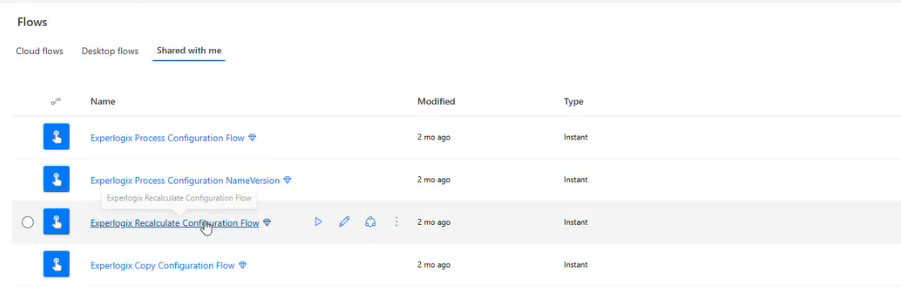
This flow is intended to be used as a building block in Power Automate and can be triggered directly or consumed as a child flow within larger business processes. Typical use cases include recalculating prices before downstream processing (for example, converting a CE quote to a sales order) or performing bulk recalculations when pricing or configuration logic changes.
Feature Availability and Scope
The Experlogix Recalculate Configuration Flow is:
-
Pre-packaged and delivered with the Cloud Connect solution
-
Immediately available in Power Automate
-
No HTTP or Integration API setup required by users
-
Designed to be generic, supporting all hosts:
-
Microsoft Dynamics 365 BC
-
Microsoft Dynamics 365 CE
-
Microsoft Dynamics 365 F&O
-
Salesforce
-
The Recalculate flow is designed to work together with Experlogix Copy Configuration, which provides the required entity and record context. All technical steps are handled within the delivered flow. Users only need to supply the required inputs.
Input Parameters
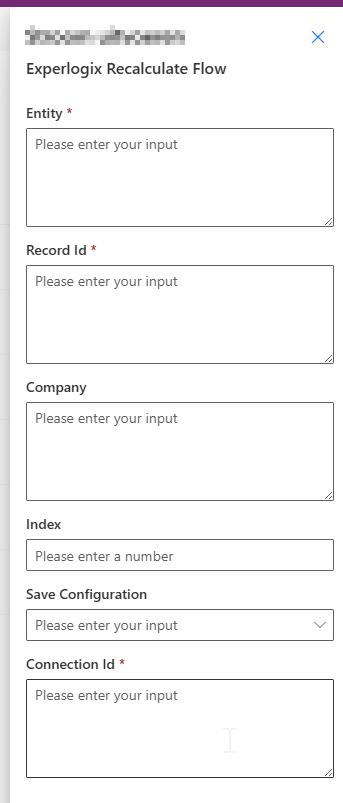
Enter values in all required fields, and then select Run the flow.
|
Parameter |
Required |
Data type |
Description |
|---|---|---|---|
|
|
Yes |
String |
Logical name of the record entity |
|
|
Yes |
String |
Record ID containing a configuration |
|
|
No |
String |
Company context (if applicable) |
|
|
No |
Long |
Line item index |
|
|
No |
Boolean |
Persist recalculated results |
|
Connection Id |
Yes |
String |
Connection identifier |
The flow validates required inputs internally.
Using the Recalculate Flow in Power Automate
The Recalculate Configuration flow can be used in the following ways:
-
Trigger the Flow Directly
-
Use the Flow as a Child Flow
Using the Flow as a Child Flow
In most scenarios, the Experlogix Recalculate Configuration flow is used as a child flow within a larger Power Automate process. This allows recalculation to run automatically as part of existing business logic instead of being triggered manually.
Common use cases include:
-
Recalculating pricing before converting a CE quote to a sales order
-
Running recalculation after pricing rules or configuration data changes
-
Performing bulk recalculations across multiple records
-
Ensuring configurations are up to date before:
-
Downstream integrations
-
Validation steps
-
Reporting or auditing workflows
-
The Experlogix Recalculate Configuration flow supports both client_credentials and password grant types. The flow reads the grant_type value from the configured environment variable and uses the specified authentication method when requesting an access token.