
Power Automate works in a multi-host environment for Cloud Connect. You can use the Power Automate solutions to create different flows. For example, creating a Power Automate flow from a Microsoft Dynamics 365 CE to a Microsoft Dynamics 365 F&O Sales Order.
The Power Automate solution contains the following types of solutions:
-
Use the following Power Automate flows if the root record exists in destination host:
-
Copy is called 'Experlogix Copy Configuration Flow'.
-
Process is called 'Experlogix Process Configuration Flow'.
-
-
Use the following Power Automate flows if the root record does not exist in the destination host:
-
Copy is called 'Experlogix Copy Configuration NameVersion'.
-
Process is called 'Experlogix Process Configuration NameVersion'.
-
Experlogix advises using a solution with a root record already created by a third party — for example, dual-party or another synchronization software.
It would be best if you used either of the following as these are two different solutions:
-
'Experlogix Copy Configuration Flow'
-
'Experlogix Process Configuration Flow'
OR
-
'Experlogix Copy Configuration NameVersion'
-
'Experlogix Process Configuration NameVersion'
Prerequisites
-
Experlogix CPQ 23.10 or later version is installed as the Process Design needs to be saved in the Integration API before using the multi-host feature.
-
The process design should contain the process structure for both the host systems.
-
The process design should contain sufficient details for creating a root record in the destination host.
Record exists in the destination host
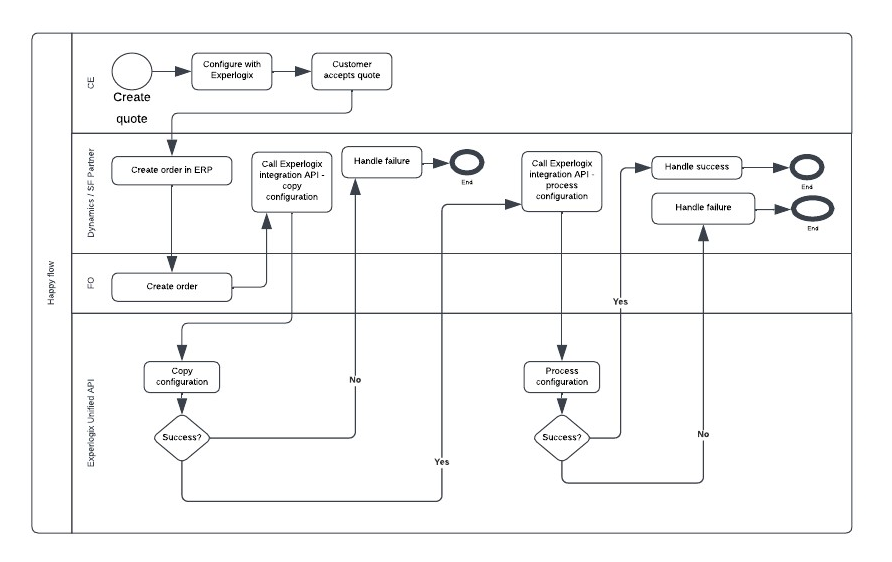
If the record already exists in the destination host, it allows for continuous data synchronization between CRM and ERP hosts (using the default Microsoft dual-write synchronization tool), but does add complexity.
Responsibilities
The following are the responsibilities of the Dynamics or Salesforce partners:
-
Create the header record in the destination host system.
-
Call the Copy Configuration endpoint in the Integration API.
-
Call the Process Configuration endpoint in the Integration API.
-
Handle success or failure based on the feedback from the Unified Integration API.
-
Ensure the copy or process endpoint is only triggered once so the integration API is not overloaded with requests.
-
If the copy succeeds and processing fails, it should ideally have the possibility to trigger only the process again.
The following are the responsibilities of Experlogix:
-
Copy the configuration in the Integration API.
-
Process the configuration in the Integration API.
Record does not exist in destination host
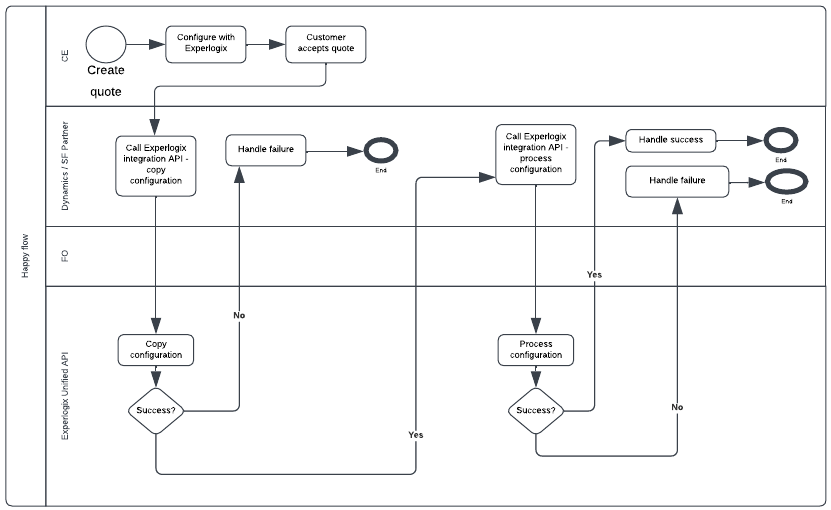
If the record does not exist in the destination host, there must be a one off creation of a Sales Order and the data synchronization is not continuous, therefore it will not be possible to use solutions like Dual Write or any other synchronization software. However, each transaction is owned by a single party, which may be helpful in defining scope.
Responsibilities
The following are the responsibilities of the Dynamics or Salesforce partners:
-
Provide a unique name for destination configuration.
-
Provide a version for destination configuration.
-
Call the Copy Configuration endpoint in the Integration API.
-
Call the Process Configuration endpoint in the Integration API.
-
Handle success or failure based on the feedback from Experlogix Unified Integration API.
-
Ensure the copy or process endpoint is only triggered once so the Integration API is not overloaded with requests.
-
If the copy succeeds and processing fails, it should ideally have the possibility to trigger only the process again.
-
Applicable to Microsoft Dynamics 365 F&O only: Number series in every Microsoft Dynamics 365 F&O company where Experlogix is required to create a sales order with the same ID, as there is only one process design.
The following are the responsibilities of Experlogix:
-
Create the 'header' record in the destination host system.
-
Copy the configuration in the Integration API.
-
Process the configuration in the Integration API.